

If your office internet feels slow or your monthly bill keeps climbing, the instinctive answer is to upgrade to a faster plan. But before signing a new ISP contract, it is worth asking a different question: what can you do to reduce internet bandwidth usage on the connection you already have? Bandwidth is a finite resource — and in most small offices, a significant portion of it is either wasted on repetitive content or consumed by low-priority traffic competing with the applications that actually matter.
A surprising proportion of office internet traffic is either repetitive — the same content fetched over and over by different devices — or low-priority — video streaming, software updates, and non-work browsing competing with your video calls and cloud applications. Both categories can be addressed without touching your ISP plan at all.
This guide covers three techniques that work at the network level to reduce internet bandwidth usage: web caching, traffic shaping, and content filtering. Together they address both the volume of traffic your network fetches and the quality of experience for the traffic that matters most.
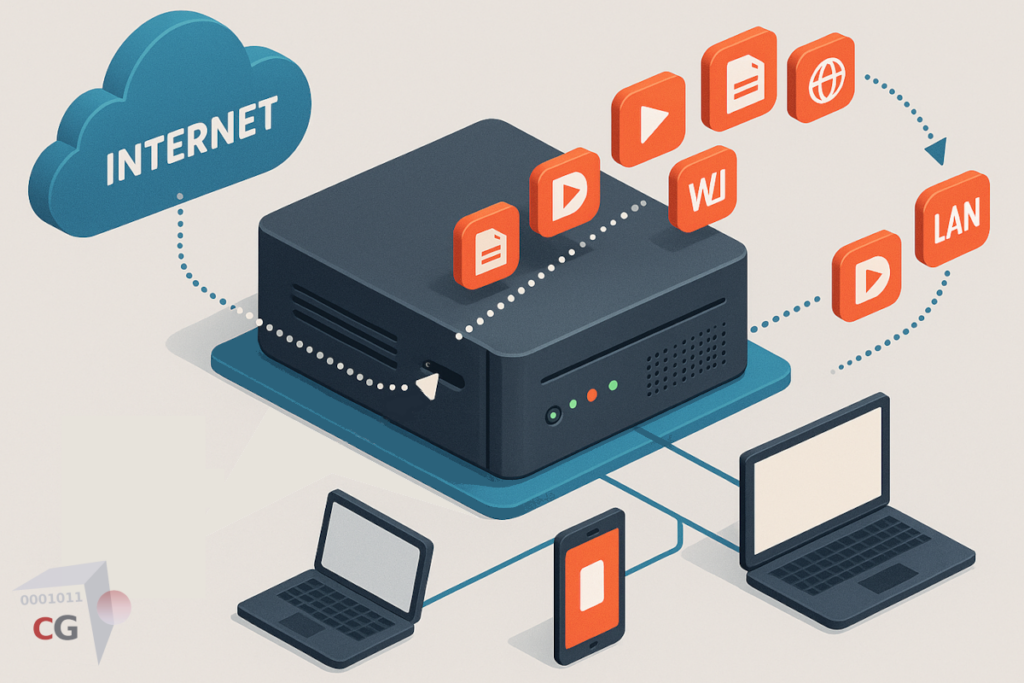
Two Strategies to Reduce Internet Bandwidth Usage
Most bandwidth optimization advice focuses on management: prioritize this traffic type over that one, shape the flow so the important stuff gets through. This is valuable — but it only helps when the connection is under load. It does not reduce how much traffic you are carrying in the first place.
The more powerful approach for an office environment is to reduce the traffic volume itself. If a significant portion of your internet traffic never needs to leave the office network — because frequently requested content is already stored locally — your connection is under less load to begin with. Traffic management then handles the remainder more effectively.
The combination of both strategies is what produces meaningful results for office networks. Start with reduction, then add management on top.
Strategy 1: Web Caching — Serve Content Locally
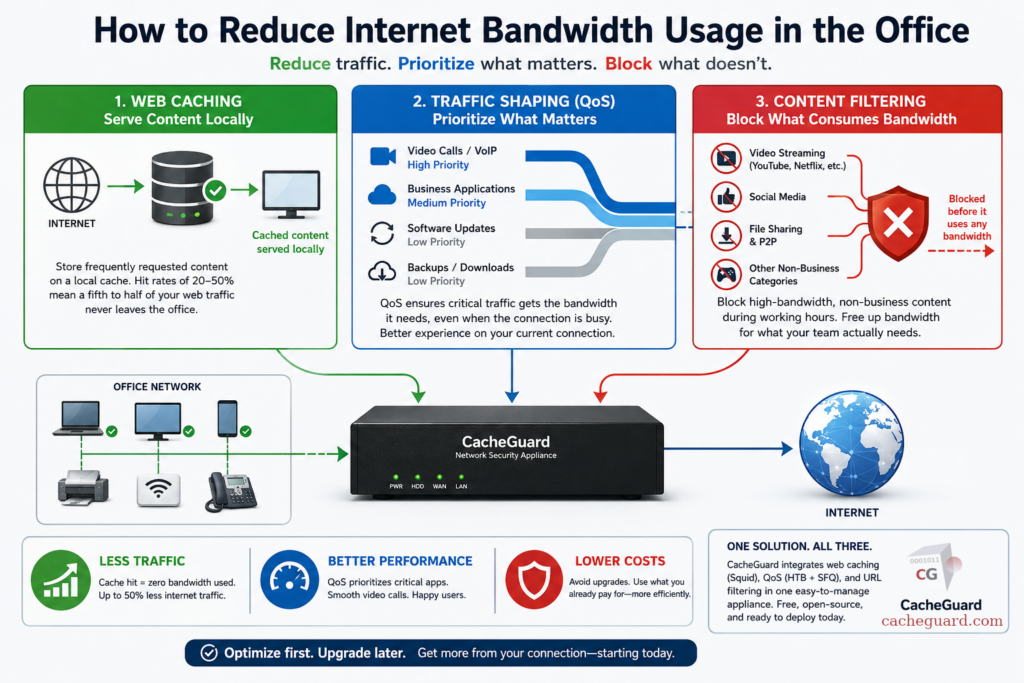
Web caching stores copies of frequently requested web content on a local server inside your network. When a second device requests the same content, it is served from the local cache rather than fetched from the internet again. The round trip to the external server never happens. The bandwidth is never consumed.
The practical impact depends on what your office does online. For environments with repetitive traffic patterns — the same SaaS applications used by many employees, shared news and reference sites, software updates downloaded to multiple machines — cache hit rates of 20 to 50 percent are achievable. That means a fifth to half of your web traffic is served locally, at zero internet bandwidth cost. For a team of thirty people on a 100 Mbps connection, this is the practical equivalent of having meaningfully more capacity without paying for it — a well-established technique used by content delivery networks at global scale, applied locally inside your office.
For a deeper technical explanation of how web caching works and what content is cacheable, see our complete guide to web caching.
The HTTPS Challenge: Caching Encrypted Bandwidth
The majority of web traffic today is encrypted — HTTPS. A standard web cache cannot read the content of encrypted responses, which means it cannot store or serve them. Without SSL inspection, your cache only handles the small remaining fraction of unencrypted HTTP traffic.
SSL inspection — where the network gateway decrypts HTTPS traffic, passes it through the cache, and re-encrypts it before delivery — makes the vast majority of web content cacheable. Enabling it dramatically increases cache hit rates and therefore bandwidth savings. It requires distributing a trusted CA certificate to devices on your network, but the operational overhead is a one-time investment that pays back continuously in reduced bandwidth consumption.
Strategy 2: Traffic Shaping — Prioritize What Matters
Even with web caching in place, some traffic volume will always need to reach the internet. Background software updates, cloud file synchronization, video conferencing, and API calls all generate outbound traffic that cannot be cached. When multiple traffic types compete for the same connection simultaneously, the user experience for latency-sensitive applications — video calls, VoIP, real-time collaboration tools — degrades first.
Quality of Service, or QoS, is the network-level mechanism for ensuring that critical traffic is prioritized over background traffic. A traffic shaping system at your gateway classifies each flow by type and assigns it to a priority tier. Video calls and VoIP are guaranteed bandwidth even when the connection is fully utilized. Software updates and backups run at reduced priority, finishing in the background without affecting call quality.
The result is that your existing connection behaves as if it is larger than it is for the applications that matter most. A 100 Mbps connection with properly configured QoS delivers a better user experience for video calls than a 500 Mbps connection with no traffic management — because the 500 Mbps connection can still be saturated by a few simultaneous large downloads at the wrong moment.
For a complete breakdown of how traffic shaping works at the network level, see our guide to Quality of Service.
Strategy 3: Content Filtering — Block What Consumes Bandwidth Unnecessarily
The third technique is the simplest to explain: if certain categories of content are consuming significant bandwidth for no business purpose, block access to them during working hours.
Video streaming is the most obvious target. A single employee streaming HD video in the background consumes as much bandwidth as ten colleagues doing ordinary office work. YouTube, Netflix, and similar services are not productivity tools, and their traffic competes directly with video calls, file uploads, and cloud synchronization during business hours.
A web proxy with URL filtering can block access to high-bandwidth content categories — streaming, file-sharing platforms, social media — on a time-of-day basis. Employees can access these services before and after working hours; during the working day, the gateway blocks the requests before they consume any bandwidth. This is a policy decision enforced technically at the network level, requiring no action on any individual device.
The bandwidth freed by blocking streaming during working hours is often more than the savings from caching or QoS alone — particularly in environments where unmanaged personal device use is common.
One Tool to Reduce Internet Bandwidth Usage Across All Three Strategies
Implementing web caching, QoS, and URL filtering separately means three different products, three configurations, and three things to maintain. For a small office without a dedicated IT team, that complexity is a real barrier.
A complete network security appliance integrates all three functions in a single device at your internet gateway. Web caching, traffic shaping, and content filtering are configured in one interface, share the same traffic pipeline, and operate without requiring any software on individual devices.
CacheGuard is a free, open-source network security appliance built on Linux that integrates all three techniques as part of its complete UTM feature set. Its web caching engine is powered by Squid — one of the most widely deployed open-source proxy platforms in the world — with SSL inspection available for caching HTTPS content. Its QoS implementation uses HTB (Hierarchical Token Bucket) combined with SFQ (Stochastic Fairness Queuing) for per-flow fairness. Its URL filtering engine supports category-based blocking with time-of-day rules, applied to every device on the network simultaneously.
CacheGuard installs from a single ISO image on any standard x86 machine or virtual machine. Configuration is through a browser-based web interface. You can download CacheGuard for free from the official website.
How to Reduce Internet Bandwidth Usage: The Realistic Picture
To reduce internet bandwidth usage effectively, the right sequence is: cache first, shape second, filter third. Caching reduces the traffic volume before it reaches the connection. QoS ensures the remaining traffic is prioritized correctly. Filtering removes unnecessary high-volume traffic from the equation entirely.
None of these techniques requires upgrading your ISP plan. All three can be implemented on hardware you already own, with free open-source software, in an afternoon. The bandwidth savings are immediate and recurring — every day the cache serves content locally, that bandwidth is not consumed on your internet connection.
If after implementing all three your connection is still insufficient for your team’s actual needs, then an ISP upgrade is genuinely warranted. But the upgrade conversation should happen after optimization, not instead of it. In most small office environments, the bandwidth you are already paying for is more than adequate — it is just being used inefficiently.
Want to go deeper? Read our complete guide to web caching for a technical breakdown of how caching works, or our guide to Quality of Service for details on traffic shaping at the network level. Ready to get started? Download CacheGuard for free and have it running today.
Questions about deploying CacheGuard? Visit the community forum at help.cacheguard.net or browse the full documentation at CacheGuard Documentation.
