

If your organization pays for metered internet bandwidth, or if your users frequently complain about slow web browsing, web caching could be one of the most impactful and cost-effective improvements you can make to your network. But what is web caching exactly, how does it work, and what does it have to do with SSL inspection?
This guide explains web caching in plain language — what it is, how it works, what it saves, and how to implement it without complexity or cost.
What Is Web Caching?
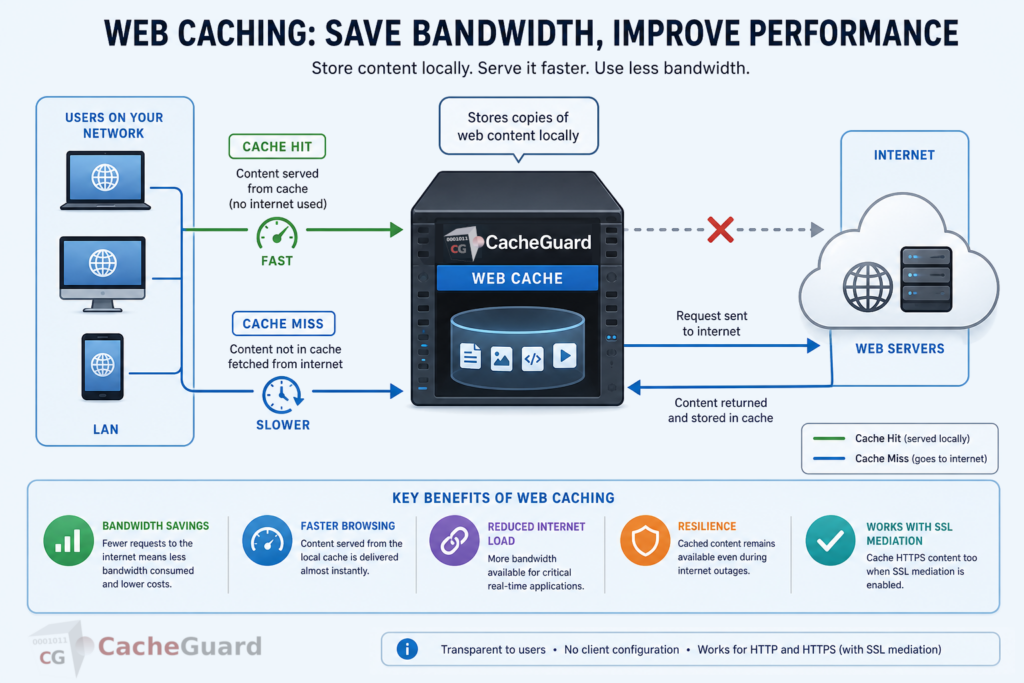
Web caching is a technique that stores copies of frequently accessed web content — web pages, images, files, scripts, videos — locally on a network appliance or server, so that subsequent requests for the same content can be served directly from the local cache rather than fetching it again from the original web server on the internet.
When a user on your network requests a web page for the first time, the request travels all the way to the web server on the internet, which sends back the response. A web cache stores a copy of that response. The next time any user on your network requests the same content, the cache serves it directly — faster, and without consuming any internet bandwidth.
What Is Web Caching Used For?
Understanding what is web caching requires understanding the problems it solves. It is used primarily for two purposes:
Bandwidth saving. Every time content is served from the local cache instead of fetched from the internet, no bandwidth is consumed on your internet connection. For organizations where the same content is accessed repeatedly by many users — software updates, cloud application assets, frequently visited websites — the cumulative bandwidth savings can be substantial.
Performance improvement. Content served from a local cache is delivered much faster than content fetched from the internet — the response comes from a machine on your local network rather than from a server potentially thousands of kilometres away. Users experience faster page loads and more responsive web applications.
How Does Web Caching Work?
Web caching works by intercepting outgoing HTTP and HTTPS requests and checking whether a valid cached copy of the requested content already exists locally.
Cache Hit vs Cache Miss
When a request comes in, the cache checks whether it has a valid copy of the requested content:
- Cache hit — a valid cached copy exists and is returned directly to the user. No internet bandwidth is consumed and the response is near-instant.
- Cache miss — no cached copy exists or the cached copy has expired. The request is forwarded to the internet, the response is returned to the user, and a copy is stored in the cache for future requests.
The ratio of cache hits to total requests is called the cache hit rate. A high cache hit rate means more bandwidth savings and better performance.
Cache Freshness and Expiry
Cached content does not stay in the cache forever. Web servers indicate how long content can be cached through HTTP headers — specifically the Cache-Control and Expires headers. When cached content reaches its expiry time, the cache either discards it or revalidates it with the web server to check whether a newer version is available.
For static content like images, scripts and stylesheets, expiry times are often set to days or weeks. For dynamic content that changes frequently, expiry times may be very short or caching may be disabled entirely.
What Is Web Caching: HTTP vs HTTPS
This is where web caching gets more complex — and where SSL inspection becomes relevant.
HTTP caching is straightforward. Since HTTP traffic is unencrypted, a web cache can read the content of every request and response, store copies of cacheable content, and serve them to future users. This works transparently without any special configuration on user devices.
HTTPS caching is fundamentally different. Since HTTPS traffic is encrypted end-to-end, a standard web cache cannot read the content of requests or responses — it can only see that an encrypted connection was made to a particular server. It cannot store or serve the content because it cannot see it.
This is why SSL inspection — called SSL mediation in CacheGuard — is a prerequisite for caching HTTPS content. By decrypting HTTPS traffic, inspecting it, and re-encrypting it, SSL mediation makes the content visible to the web cache, which can then store and serve it just like HTTP content.
The result is that organizations with SSL mediation enabled benefit from web caching across virtually all web traffic — not just the small and shrinking fraction that still uses unencrypted HTTP.
What Is Web Caching: Key Benefits
Bandwidth Savings
The most immediate and measurable benefit of web caching is bandwidth reduction. In environments where many users access the same content — software update servers, cloud application assets, popular websites, streaming content — a significant proportion of that traffic can be served from the local cache rather than the internet.
For organizations paying for metered bandwidth or operating in locations with limited or expensive internet connectivity, these savings translate directly into cost reduction.
Faster Web Browsing
Content served from a local cache arrives almost instantly — it travels only across your local network rather than across the internet. Users experience noticeably faster page loads, particularly for content-heavy websites and web applications that load many assets.
Reduced Internet Link Load
By serving cached content locally, web caching reduces the load on your internet connection — leaving more bandwidth available for traffic that cannot be cached, such as real-time video calls, VoIP and live data feeds.
Resilience
A web cache can continue serving cached content even if your internet connection experiences temporary disruption — providing a degree of resilience for frequently accessed resources during brief outages.
What Is Web Caching in CacheGuard?
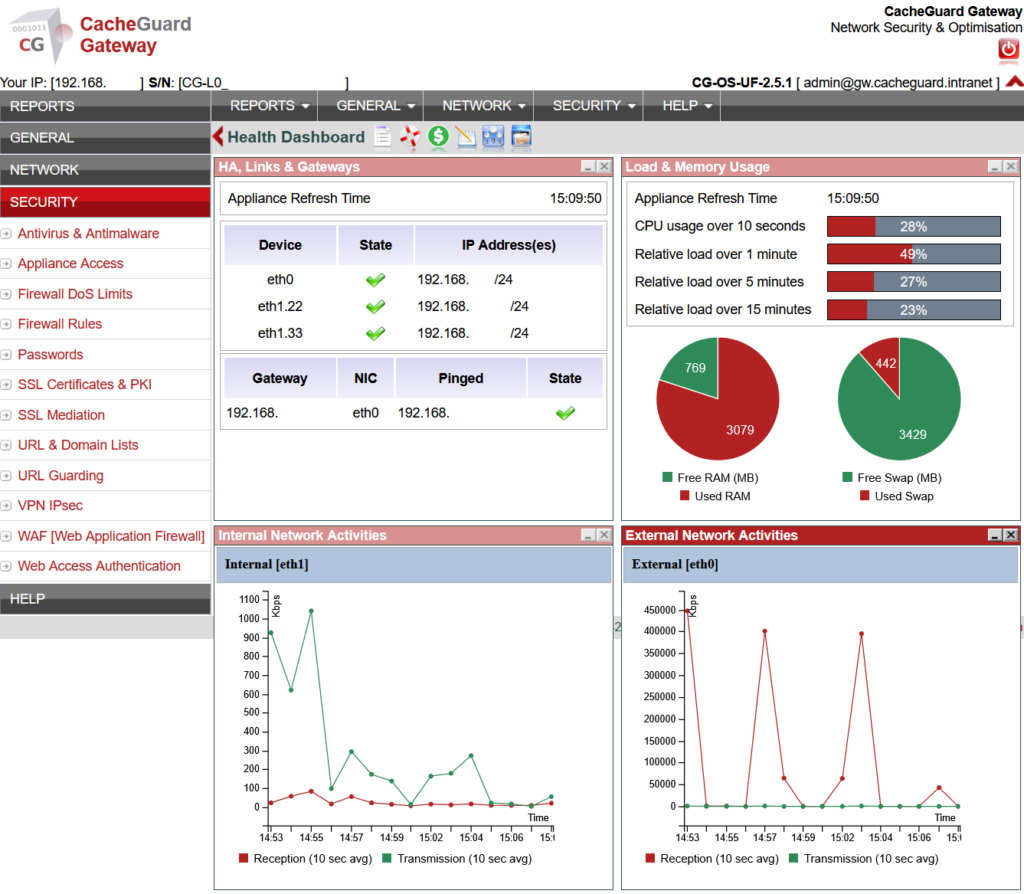
CacheGuard includes a fully integrated web caching engine as a built-in feature of its free, open-source network security appliance — powered by Squid, one of the most widely deployed and trusted open-source web caching solutions in the world.
CacheGuard’s web caching works seamlessly alongside its SSL mediation feature. When SSL mediation is enabled, CacheGuard can cache both HTTP and HTTPS content — dramatically increasing the proportion of traffic that can be served from the local cache and maximizing bandwidth savings.
Key characteristics of CacheGuard’s web caching:
- Transparent caching — users do not need to configure anything on their devices. All web traffic passes through the cache automatically.
- HTTP and HTTPS caching — when combined with SSL mediation, both encrypted and unencrypted web content is cached.
- Configurable cache size — the cache size is configurable based on available disk space on your appliance.
- Standard cache controls — CacheGuard respects HTTP cache control headers, ensuring that content is cached and refreshed according to the policies set by web servers.
Because web caching is integrated into CacheGuard’s complete UTM appliance, it works alongside the firewall, web antivirus, URL filtering, SSL inspection and QoS — in a single, coordinated system with no additional software, plugins or licensing required.
Full configuration instructions are available in the CacheGuard User’s Guide. Note that while the User’s Guide describes basic configuration using the CLI, all settings can equally be configured through the Web GUI.
What Is Web Caching: What Cannot Be Cached
Not all web content can or should be cached. Understanding these limitations is important for setting realistic expectations:
Dynamic and personalized content. Web pages that are generated dynamically for each user — dashboards, account pages, shopping carts — typically cannot be cached because their content is unique to each user and changes with each request.
Real-time data. Live feeds, stock prices, news updates and other real-time data sources are not cacheable because their value depends on being current.
HTTPS content without SSL mediation. As explained above, HTTPS content cannot be cached without SSL mediation. Organizations that choose not to enable SSL mediation will only benefit from caching for HTTP traffic.
Content with no-cache directives. Web servers can instruct caches not to store certain content by setting appropriate Cache-Control headers. CacheGuard respects these directives.
Conclusion
Web caching is one of the most practical and immediately impactful network optimizations available to any organization. It reduces bandwidth consumption, improves web performance and lowers internet connectivity costs — all without requiring any changes to user devices or applications.
Combined with SSL mediation, web caching in CacheGuard extends these benefits to HTTPS traffic — covering the vast majority of modern web content. And because it is built into a complete, free UTM appliance, there is no additional cost, no separate product to deploy and no extra configuration required.
Download CacheGuard for free and start saving bandwidth on your network today.
Questions about deploying CacheGuard? Visit the community forum at help.cacheguard.net or browse the full documentation at CacheGuard Documentation.
