

If you are looking for a Cisco Meraki alternative, you are most likely motivated by one or more of its well-known pain points — the mandatory annual licensing fees, the proprietary hardware requirements, the cloud dependency, and the uncomfortable reality that when your license expires, your appliances stop working entirely.
Cisco Meraki is a genuinely impressive network management platform. But impressive does not always mean the right fit — especially for organizations that want enterprise-grade security without the enterprise price tag and vendor lock-in that Meraki brings. This article explains what Meraki offers, where it falls short, and why CacheGuard is worth considering as a Cisco Meraki alternative for startups, SMBs and budget-conscious organizations.
What Is Cisco Meraki?
Cisco Meraki is a cloud-managed networking platform that provides security appliances, wireless access points, switches, and mobile device management — all managed from a centralized cloud dashboard. It is designed for ease of management across distributed networks, making it popular in education, retail, healthcare and hospitality.
The Meraki MX security appliance is its UTM product — combining firewall, VPN, intrusion prevention, content filtering, antivirus and SD-WAN into a single device. The Meraki dashboard gives administrators a single pane of glass to manage their entire network infrastructure, including remote troubleshooting and automatic firmware updates.
Meraki is trusted by hundreds of thousands of organizations worldwide and is backed by the full weight of Cisco’s reputation and support infrastructure. For large enterprises with complex distributed networks and significant IT budgets, it remains a strong choice.
Why Organizations Look for a Cisco Meraki Alternative
Despite its strengths, Cisco Meraki has several characteristics that push organizations to look for alternatives:
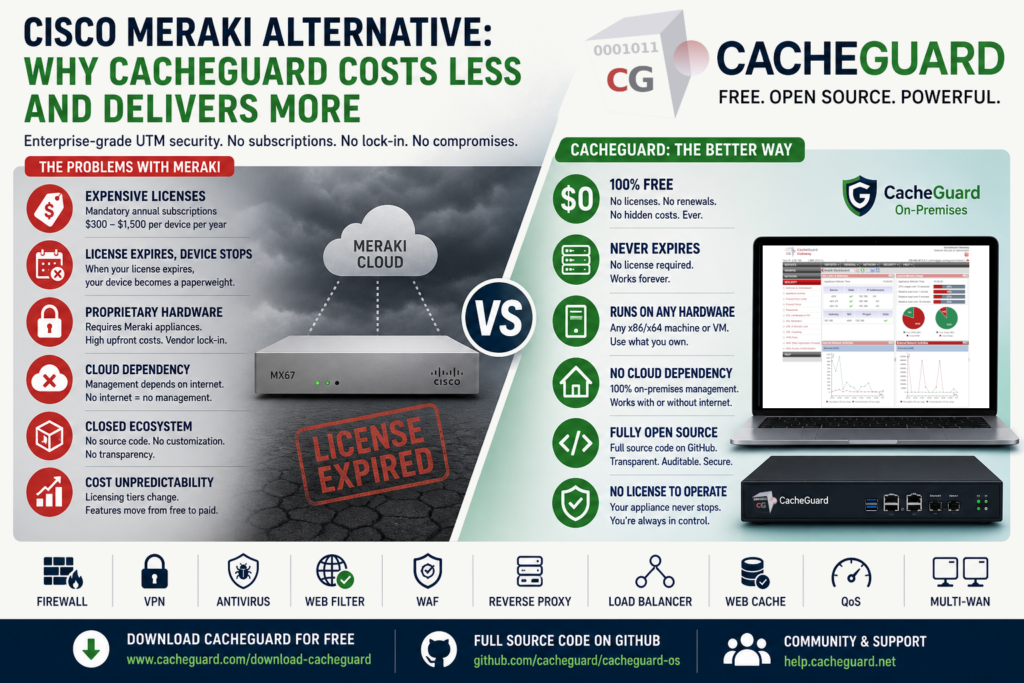
Mandatory and expensive licensing. Meraki operates on a subscription licensing model where every device requires an active license to function. A 3-year Advanced Security license for a Meraki MX67 — a model suitable for small to medium deployments — typically costs $450 to $550. Larger models and longer deployments scale significantly higher. Annual costs per device can range from $300 to $1,500 depending on the model and security tier.
Devices become paperweights without a license. This is Meraki’s most criticized characteristic. When a license expires, the device stops functioning — even as a basic firewall. Organizations that cannot or choose not to renew are left with expensive hardware they cannot use. As one user put it, when the license runs out you have an expensive paperweight.
Proprietary hardware lock-in. Meraki requires proprietary hardware appliances. You cannot run Meraki on commodity servers, virtual machines or cloud instances you already own without paying for additional licensing. This creates both vendor lock-in and significant upfront hardware investment.
Cloud dependency. Meraki’s management dashboard is entirely cloud-based. While this enables remote management from anywhere, it also means that management functions rely entirely on internet connectivity. If your internet connection goes down, remote management is unavailable — a concern for organizations in locations with unreliable connectivity.
Closed ecosystem. Meraki is a closed, proprietary platform. You cannot inspect the code, customize its behavior or deploy it on infrastructure you choose. For organizations that value software sovereignty or open-source transparency, this is a fundamental limitation.
Cost unpredictability. Meraki’s licensing model has historically fluctuated — features that were free have become paid, and licensing tiers have changed over time. This makes long-term budget planning more difficult than with a stable open-source alternative.
CacheGuard as a Cisco Meraki Alternative
CacheGuard takes a fundamentally different approach to the same problem. Rather than a cloud-managed proprietary platform with mandatory subscription licensing, CacheGuard delivers a complete, integrated UTM security stack in a single ISO — free to deploy on any hardware, with no subscription fees, no license expiry and no vendor lock-in.
A completely free Cisco Meraki alternative
CacheGuard-OS is completely free regardless of the number of users, devices or appliances you deploy. There are no licensing tiers, no annual renewals and no features locked behind a paywall. The software never stops working because a license expired. Optional paid support plans are available for organizations that need guaranteed response times — but the software itself is always free.
For an organization that would otherwise be paying hundreds to thousands of dollars per year per device for Meraki licensing, the savings are immediate and permanent.
Run it on any hardware
Unlike Meraki, which requires proprietary hardware appliances, CacheGuard runs on any standard x86/x64 bare-metal machine or virtual machine — including hardware you already own. VMware, VirtualBox, Proxmox, KVM, Hyper-V, AWS, Azure — CacheGuard works on all of them at no additional cost.
This eliminates hardware vendor lock-in entirely. If your hardware fails, you replace it with any compatible machine and restore your configuration. No proprietary replacement parts, no hardware EOL concerns, no vendor dependency.
No cloud dependency
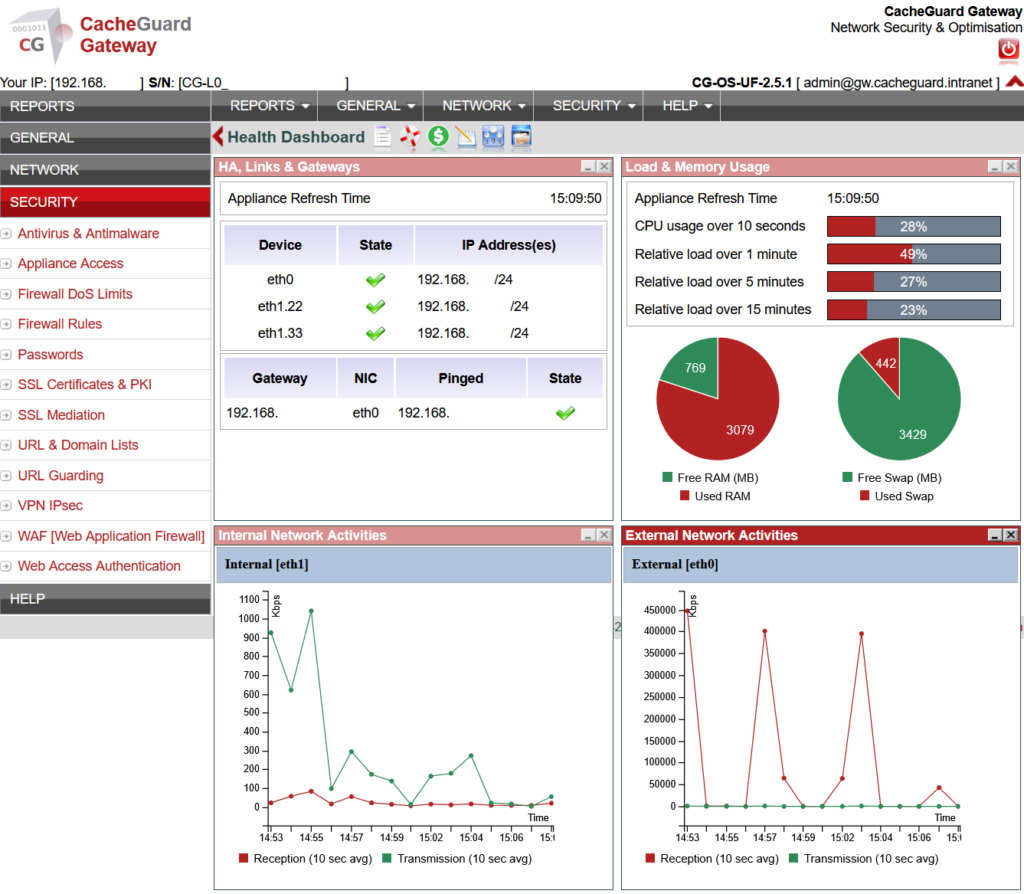
CacheGuard is managed entirely on-premises through its web interface, accessible at https://<your-cacheguard-ip>:8090. There is no cloud dependency — management works regardless of your internet connection status. For organizations in locations with unreliable connectivity, or those with strict data sovereignty requirements, this is a significant advantage.
For multi-site deployments, CacheGuard Manager provides centralized management of multiple CacheGuard Gateway appliances — deployed on your own infrastructure, not in a third-party cloud.
Fully open source
CacheGuard-OS is completely open source, with the full source code available on GitHub — representing over 5,000 man days of research and development since 2002. Every component can be inspected, audited and verified. For a security appliance that sits at the heart of your network, this transparency is not a nice-to-have — it is a fundamental security requirement.
Cisco Meraki vs CacheGuard: Feature Comparison
| Feature | Cisco Meraki MX | CacheGuard |
|---|---|---|
| Firewall | ✅ Advanced | ✅ Standard, suitable for most deployments |
| IPsec VPN | ✅ | ✅ |
| SSL VPN (AnyConnect) | ✅ Paid add-on | ❌ IPsec only |
| Web antivirus | ✅ Advanced Security tier | ✅ Built-in, free |
| URL / content filtering | ✅ Advanced Security tier | ✅ Built-in, free, LDAP/AD |
| SSL inspection | ✅ | ✅ Built-in, free |
| WAF | ❌ | ✅ Built-in, free |
| Reverse proxy | ❌ | ✅ Built-in, free |
| Load balancer | ❌ | ✅ Built-in, free |
| Web caching | ❌ | ✅ Built-in, free |
| Multi-WAN and QoS | ✅ SD-WAN | ✅ Multi-WAN failover and QoS, free |
| Centralized management | ✅ Cloud dashboard | ✅ CacheGuard Manager, on-premises |
| Intrusion prevention (IPS) | ✅ | ❌ |
| Cloud-managed | ✅ | ❌ On-premises only |
| Hardware flexibility | ❌ Proprietary only | ✅ Any x86 hardware or VM |
| Open source | ❌ | ✅ Full codebase |
| License required to operate | ❌ Yes — device stops without it | ✅ Never required |
| Cost | Proprietary hardware + annual subscription | Free |
Who Should Choose CacheGuard as Their Cisco Meraki Alternative
CacheGuard is the right Cisco Meraki alternative for:
Startups and growing businesses that need enterprise-grade UTM security but cannot justify Meraki’s hardware and licensing costs. CacheGuard delivers firewall, VPN, antivirus, WAF, URL filtering, SSL inspection, reverse proxy and QoS — all free, on hardware you already own.
Budget-conscious organizations that want to eliminate annual renewal cycles and avoid the risk of devices becoming non-functional when licenses expire. CacheGuard never stops working.
Organizations with data sovereignty requirements that cannot or do not want their network management to depend on a third-party cloud platform. CacheGuard is managed entirely on-premises.
Organizations that value open source transparency. CacheGuard’s full source code is publicly auditable — something Meraki, as a closed proprietary platform, fundamentally cannot offer.
MSPs and IT consultants who need a cost-effective, repeatable security solution they can deploy for multiple clients without per-device licensing costs eating into their margins.
Who Should Stick With Cisco Meraki
CacheGuard is not the right choice for every organization. Meraki remains the better option for:
- Large enterprises with complex distributed networks that benefit from Meraki’s cloud-managed, zero-touch provisioning model
- Organizations that specifically need AnyConnect SSL VPN or Cisco’s advanced SD-WAN analytics and application-aware routing
- Deployments requiring Meraki’s intrusion prevention system (IPS) or advanced threat intelligence
- Organizations already deep in the Cisco ecosystem where Meraki integrations add genuine value
- IT teams that prioritize vendor-backed SLAs and 24/7 enterprise support over cost savings
How to Get Started With CacheGuard
Getting started with CacheGuard as your Cisco Meraki alternative is straightforward:
- Download CacheGuard for free from cacheguard.com
- Install on any x86/x64 bare-metal machine or VM with at least two network interfaces
- Access the web interface and configure your network settings
- Enable security features progressively — firewall, VPN, antivirus, WAF, URL filtering
- Your network is protected in under an hour — at zero ongoing cost
The full source code is available on GitHub and the documentation covers every step in detail.
Conclusion
If you are looking for a Cisco Meraki alternative that delivers comprehensive UTM security without proprietary hardware, mandatory subscription fees, cloud dependency or the risk of your appliances becoming paperweights, CacheGuard is a compelling choice.
It does not replicate every aspect of Meraki — AnyConnect VPN, advanced IPS and cloud-managed zero-touch provisioning remain Meraki strengths. But for the vast majority of startups, small businesses and budget-conscious organizations, CacheGuard covers every security need that matters — completely free, on any hardware, managed on your own infrastructure, forever.
Download CacheGuard for free and see how much you can save without compromising on security.
Questions about deploying CacheGuard? Visit the community forum at help.cacheguard.net or browse the full documentation at CacheGuard Documentation.
