

If you have ever experienced poor video call quality while someone on your network was downloading a large file, you have experienced what happens without QoS. But what is QoS exactly, how does it work, and why does your network need it?
This guide explains Quality of Service in plain language — what it is, how it prioritizes traffic, what it protects against, and how to implement it without complexity or cost.
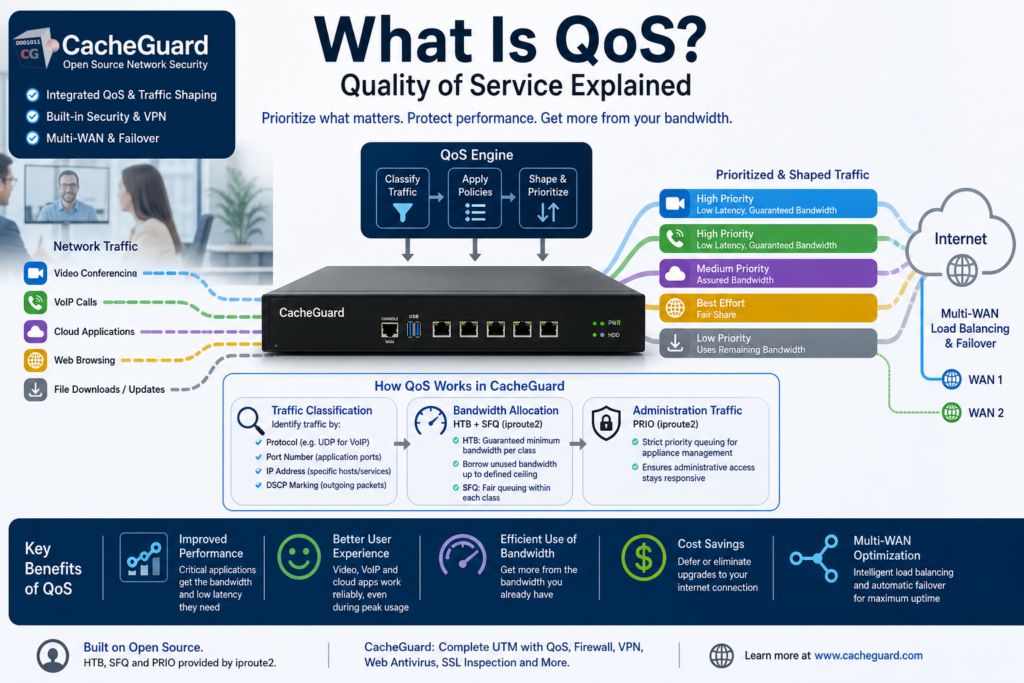
What Is QoS?
QoS — short for Quality of Service — is a set of techniques used to manage network traffic by prioritizing certain types of data over others. Rather than treating all traffic equally, a network device with QoS enabled can identify different types of traffic and ensure that the most important applications always get the bandwidth and low latency they need — even when the network is congested.
Without QoS, all traffic on your network competes equally for available bandwidth. A large file download has exactly the same priority as a live video call, a VoIP phone call or a cloud application your business depends on. The result is unpredictable performance — the applications that matter most get degraded at exactly the moment the network is under the most load.
With QoS, you define the rules. Critical traffic gets priority. Less important traffic waits.
Why Your Network Needs QoS
Understanding what is QoS requires understanding the problems it solves. Here are the most common scenarios where QoS makes a significant difference:
Video conferencing. Video calls require consistent low latency and steady bandwidth. Even brief interruptions cause freezing, pixelation and audio dropout. Without QoS, a background file download or software update can ruin a customer call or a remote team meeting.
VoIP phone calls. Voice over IP is extremely sensitive to latency and packet loss. Even a few milliseconds of jitter can make a call sound choppy and unprofessional. QoS ensures VoIP traffic is always delivered with the priority it needs.
Cloud applications. Business-critical cloud services — CRM, ERP, accounting software — need consistent performance to remain productive. Without QoS, these applications can become sluggish when other traffic saturates your internet connection.
Remote workers. When multiple remote employees connect through a VPN simultaneously, their combined traffic can saturate your upstream bandwidth. QoS ensures that business-critical traffic from remote workers is prioritized over background activity like software updates or backups.
Multi-WAN environments. Organizations with multiple internet connections need to distribute traffic intelligently across those connections, maximizing the use of all available bandwidth and ensuring continuity if one link fails.
What Is QoS: How It Works
QoS works by classifying network traffic into categories and then applying different treatment to each category based on rules defined by the administrator.
Traffic Classification
The first step is identifying what type of traffic each packet belongs to. QoS can classify traffic based on:
- Protocol — for example UDP traffic from VoIP applications
- Port number — specific ports associated with known applications
- IP address — traffic to or from specific servers or services
CacheGuard can also mark the DSCP field in outgoing packets — allowing downstream network devices that support DSCP-based QoS to apply their own prioritization rules accordingly. However CacheGuard itself does not use DSCP marks as a classification input for its own QoS decisions.
Bandwidth Allocation with HTB and SFQ
CacheGuard’s QoS is primarily based on bandwidth allocation — defining how much bandwidth is allowed for each type of traffic. This is implemented using HTB (Hierarchical Token Bucket) combined with SFQ (Stochastic Fairness Queuing), both provided by iproute2. HTB organizes traffic into a hierarchy of classes, each with its own guaranteed minimum bandwidth and configurable maximum bandwidth ceiling. SFQ is used in combination with HTB to ensure fair distribution of bandwidth among multiple flows within each class, preventing any single flow from monopolizing its allocated bandwidth.
HTB ensures that each traffic class gets at least its guaranteed share of bandwidth, and can borrow unused bandwidth from other classes up to its defined ceiling. This makes it an ideal mechanism for ensuring that critical applications always have the bandwidth they need without completely starving lower priority traffic.
PRIO for Administration Traffic
For traffic destined to the CacheGuard appliance itself — administration and management traffic — CacheGuard uses the PRIO queuing discipline, also provided by iproute2. PRIO ensures that appliance management traffic is handled with strict priority, guaranteeing that administrative access to the appliance remains responsive even when the network is under heavy load.
What Is QoS: Key Benefits
Improved application performance. By ensuring that critical applications always get the bandwidth and low latency they need, QoS delivers consistent performance regardless of what else is happening on your network.
Better user experience. Video calls, VoIP and cloud applications perform reliably — even during peak usage periods. Users notice the difference immediately.
Efficient use of available bandwidth. Rather than upgrading your internet connection every time performance degrades, QoS allows you to get more out of the bandwidth you already have by using it more intelligently.
Cost savings. Effective QoS can defer or eliminate the need to upgrade your internet connection, delivering significant cost savings over time.
Multi-WAN optimization. In environments with multiple internet connections, QoS can distribute traffic across links intelligently — maximizing the use of all available bandwidth and providing automatic failover if one connection fails.user’s
What Is QoS in Network Security Appliances?
QoS is typically implemented at the network gateway — the point where your internal network connects to the internet. This is the ideal location because it gives the QoS engine visibility into all traffic entering and leaving your network, allowing it to make prioritization decisions based on the complete picture of network activity.
In a UTM appliance, QoS works alongside the firewall, VPN and other security functions — using the same traffic classification information that the firewall uses to make security decisions, to also make QoS prioritization decisions. This integration means that a UTM with QoS gives you security and performance management in a single, coordinated system.
QoS in CacheGuard
CacheGuard includes a fully integrated QoS and traffic shaping engine as a built-in feature of its free, open-source network security appliance — requiring no additional software, plugins or licensing.
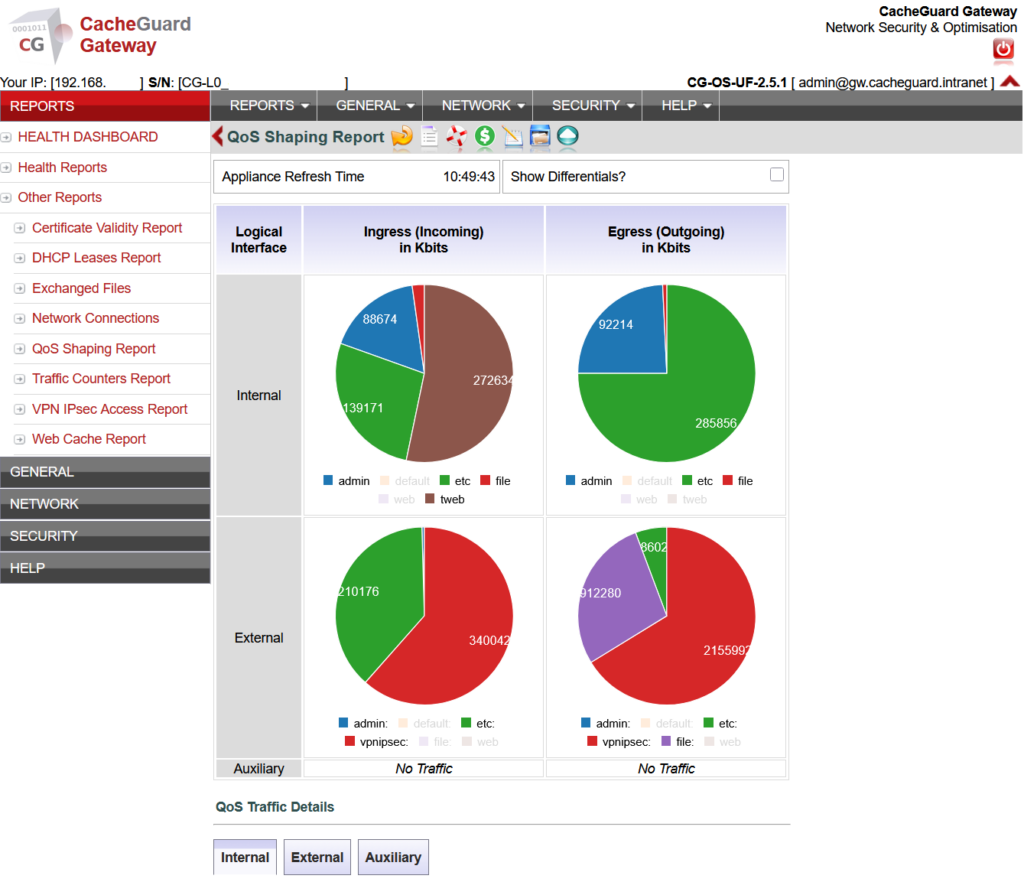
CacheGuard’s QoS capabilities include:
- Bandwidth allocation per traffic class — define minimum guaranteed and maximum bandwidth for each type of traffic using HTB (Hierarchical Token Bucket) combined with SFQ (Stochastic Fairness Queuing), ensuring both fair and efficient use of allocated bandwidth
- DSCP marking — mark the DSCP field in outgoing packets so downstream devices can apply their own prioritization rules
- Priority queuing for administration traffic — PRIO queuing ensures that appliance management and administration traffic is always handled with strict priority, keeping administrative access responsive under any network load
- Multi-WAN load balancing — distribute traffic intelligently across multiple internet connections, with automatic failover if one connection fails
- WAN failover — automatically switch traffic to a backup internet connection if the primary link goes down
HTB, SFQ and PRIO are all provided by iproute2 — the standard Linux networking toolkit — making CacheGuard’s QoS implementation robust, battle-tested and built on proven open-source foundations.
Because QoS is integrated into CacheGuard’s complete UTM appliance, it works alongside the firewall, VPN, web antivirus and SSL inspection — giving you a single, coordinated system for both security and network performance management.
Full configuration instructions are available in the CacheGuard User’s Guide. Note that while the User’s Guide describes basic configuration using the CLI, all settings can equally be configured through the Web GUI.
What Is QoS: Common Mistakes to Avoid
Not classifying traffic correctly. QoS is only as good as its traffic classification. If your VoIP traffic is not correctly identified and allocated sufficient bandwidth, QoS will not help. Take time to understand what applications your network runs and configure bandwidth allocation rules accordingly.
Over-provisioning high-priority classes. If you assign too much bandwidth to high-priority traffic, you leave insufficient bandwidth for other applications. Balance your allocations carefully based on actual usage patterns.
Ignoring upload bandwidth. Most organizations focus QoS on download traffic but upload bandwidth is equally important — particularly for video conferencing and VoIP where upload quality directly affects the experience of the person on the other end of the call.
Setting it and forgetting it. Your network traffic patterns change as your business grows and new applications are introduced. Review and update your QoS configuration regularly to ensure it still reflects your actual needs.
Conclusion
QoS is not a luxury feature reserved for large enterprises — it is an essential tool for any organization that relies on real-time applications like video conferencing, VoIP or cloud software. Without it, your most important traffic competes equally with background downloads and updates, with unpredictable and often frustrating results.
With CacheGuard, QoS is built in and free — part of a complete network security and performance management stack that installs in under an hour on any x86 machine or VM.
Download CacheGuard for free and have your network fully optimized and protected in under an hour.
Questions about deploying CacheGuard? Visit the community forum at help.cacheguard.net or browse the full documentation at CacheGuard Documentation.
