

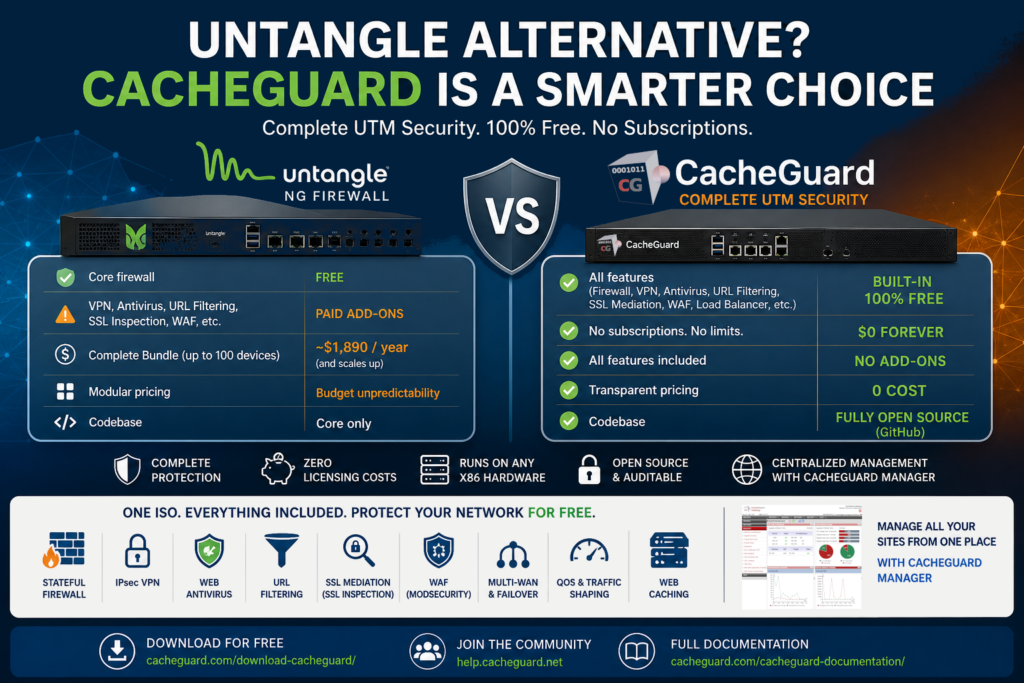
If you are looking for an Untangle alternative, cost is probably the first reason. Untangle NG Firewall has a compelling proposition — a free core firewall with paid add-ons — but the moment you need the full security stack, the subscription fees add up quickly. A complete bundle covering up to 100 devices runs close to $1,890 per year, and the price scales with the number of devices and the length of your subscription.
This article explains what Untangle offers, where it falls short for budget-conscious organizations, and why CacheGuard is worth considering as a fully free, open-source Untangle alternative that delivers a complete UTM out of the box.
What Is Untangle NG Firewall?
Untangle NG Firewall is a network security platform that takes a modular, app-store approach to UTM security. The core firewall is free and open source — but most of the security features that make it a true UTM require paid add-on subscriptions. Features like SSL inspection, web antivirus, content filtering, application control and WAN failover are all paid modules bundled into the Complete subscription.
Untangle can be deployed as a hardware appliance, a virtual machine, or on standard x86 hardware. It offers a browser-based interface, centralized management via its Command Center cloud platform, and supports deployment on AWS and Azure.
It is a well-regarded product particularly popular with schools and small businesses that appreciate its ease of use and modular pricing model.
Why Organizations Look for an Untangle Alternative
Despite its strong reputation, Untangle is not the right fit for every organization. Here are the most common reasons businesses start looking for an Untangle alternative:
The free version is too limited. The free tier of Untangle provides basic firewall functionality but lacks the security features that most organizations actually need — web antivirus, SSL inspection, content filtering and application control all require paid subscriptions. You quickly discover that the free version is more of a trial than a complete solution.
Subscription costs add up fast. The Complete bundle starts at $720 for three years covering up to 12 devices — and scales significantly for larger deployments. At $1,890 per year for up to 100 devices, the annual cost becomes substantial for a small business or nonprofit operating on a tight budget.
Modular pricing creates budget unpredictability. While the app-store model is flexible, it can make budgeting difficult — each module has its own price, and the cost of building a complete security stack feature by feature can exceed the bundle price in unexpected ways.
Declining market presence. Untangle’s mindshare in the firewall market has been declining, which raises legitimate questions about the long-term trajectory of the product and the pace of feature development.
Web content filtering limitations. Multiple user reviews highlight that Untangle’s web filtering capabilities need improvement, particularly on the free tier.
CacheGuard as an Untangle Alternative: What Makes It Different
CacheGuard takes a fundamentally different approach. Rather than a modular platform where you pay for each feature separately, CacheGuard delivers a complete, integrated UTM security stack in a single ISO — free to deploy on any hardware, with no subscription fees and no feature tiers.
A completely free Untangle alternative
CacheGuard-OS is completely free regardless of the number of users, devices or appliances you deploy. There are no licensing tiers, no annual renewals and no features locked behind a paywall. Everything is included from day one.
For a small business or school that would otherwise be paying $700 to $1,900 per year for Untangle Complete, that represents significant and permanent cost savings.
Everything included out of the box
Where Untangle requires paid add-ons to reach full UTM feature parity, CacheGuard includes everything built in and working together from day one:
- Stateful firewall with fine-grained traffic control rules
- IPsec VPN for secure remote access and site-to-site connectivity
- Gateway-level web antivirus powered by ClamAV
- Filtering web proxy with URL filtering capabilities
- SSL inspection — called SSL mediation in CacheGuard — for encrypted traffic scanning and HTTPS caching
- Web Application Firewall powered by ModSecurity and OWASP Core Rule Set
- Reverse proxy and application load balancer
- Multi-WAN support with automatic failover and load balancing
- QoS and traffic shaping to prioritize critical applications
- Web caching to reduce bandwidth consumption
- Centralized management via CacheGuard Manager for multi-site deployments
No modules, no add-ons, no surprises.
Run it on any hardware
Like Untangle, CacheGuard runs on standard x86 bare-metal machines or virtual machines. Unlike Untangle, there is no paid virtual license or subscription required to run it. Install the ISO on any machine you already own — physical or virtual — and you have a complete UTM appliance at zero ongoing cost.
Fully open source and auditable
CacheGuard-OS is completely open source, with the full source code available on GitHub. Every component can be inspected, audited and verified — critical for a security appliance that sits at the heart of your network.
Untangle vs CacheGuard: Feature Comparison
| Feature | Untangle NG Firewall | CacheGuard |
|---|---|---|
| Firewall | ✅ Free | ✅ Free |
| IPsec VPN | ⚠️ Paid add-on | ✅ Built-in, free |
| SSL VPN (OpenVPN) | ⚠️ Paid add-on | ❌ IPsec only |
| Web antivirus | ⚠️ Paid add-on | ✅ Built-in, free |
| URL filtering | ⚠️ Paid add-on | ✅ Built-in, free, LDAP/AD |
| SSL inspection | ⚠️ Paid add-on | ✅ Built-in, free |
| WAF | ❌ | ✅ Built-in, free |
| Reverse proxy | ❌ | ✅ Built-in, free |
| Load balancer | ❌ | ✅ Built-in, free |
| Web caching | ⚠️ Paid add-on | ✅ Built-in, free |
| Multi-WAN and QoS | ⚠️ Paid add-on | ✅ Built-in, free |
| Centralized management | ⚠️ Paid cloud platform | ✅ CacheGuard Manager, free |
| Open source | ✅ Core only | ✅ Full codebase |
| Hardware flexibility | ✅ Any x86 | ✅ Any x86 |
| Cost | Free core + paid add-ons | Completely free |
Who Should Choose CacheGuard as Their Untangle Alternative
CacheGuard is the right Untangle alternative for:
Startups and growing businesses that need a complete UTM without paying for individual security modules. CacheGuard delivers the full stack — firewall, VPN, antivirus, WAF, URL filtering, SSL inspection — at zero licensing cost.
Schools and educational institutions that appreciate Untangle’s content filtering but need a more cost-effective solution. CacheGuard includes URL filtering built in at no additional cost.
Budget-conscious organizations that want to avoid subscription renewals and modular pricing. With CacheGuard there is no annual fee, no per-device licensing and no feature tiers.
Organizations that value open source transparency. CacheGuard’s full source code is on GitHub — not just the core, but the entire codebase representing over 5,000 man days of research and development since 2002.
MSPs and IT consultants who need a repeatable, cost-effective security solution they can deploy for multiple clients without per-device or per-user licensing costs.
Who Should Stick With Untangle
CacheGuard is not the right choice for every organization. Untangle remains the better option for:
- Organizations that specifically need OpenVPN or SSL VPN rather than IPsec
- Teams that prefer Untangle’s app-store model and want to pay only for the features they use
- Deployments that rely on Untangle’s Active Directory integration via Directory Connector
- Organizations that need Untangle’s intrusion prevention system (IPS) features
- Teams already familiar with Untangle’s interface who do not want to migrate
How to Get Started With CacheGuard
Getting started with CacheGuard as your Untangle alternative is straightforward:
- Download the free CacheGuard-OS ISO from cacheguard.com
- Install on any x86 bare-metal machine or VM with at least two network interfaces
- Access the web interface and configure your basic network settings
- Enable security features progressively — firewall, VPN, antivirus, WAF
- Your network is protected in under an hour — at zero cost
The full source code is available on GitHub and the documentation covers every step in detail.
Conclusion
If you are looking for an Untangle alternative that gives you a complete UTM security stack without subscription fees, modular pricing or feature restrictions, CacheGuard is a compelling choice.
It does not replicate every aspect of Untangle — OpenVPN, Active Directory integration and IPS remain Untangle strengths. But for the vast majority of startups, small businesses, schools and growing organizations, CacheGuard covers every security need that matters — completely free, on any hardware, forever.
Download CacheGuard for free and see how much you can save without compromising on security.
Questions about deploying CacheGuard? Visit the community forum at help.cacheguard.net or browse the full documentation at CacheGuard Documentation.
