

Network security for remote workers is one of those problems that changed permanently after 2020. When an employee works from the office, they are behind a firewall, a managed network, and a gateway that inspects traffic before it reaches the internet. When that same employee works from home, all of that disappears. Their traffic flows through a consumer router with a default password, a home WiFi network shared with family members and personal devices, and an internet connection with no security layer beyond what is on their individual machine.
CISA identifies the home network as the primary security risk for remote workers — not because home networks are targeted specifically, but because they offer none of the protections that office networks provide as a baseline. This guide covers what those missing protections are, and how a self-hosted VPN server restores them without requiring commercial subscriptions or complex enterprise tools.
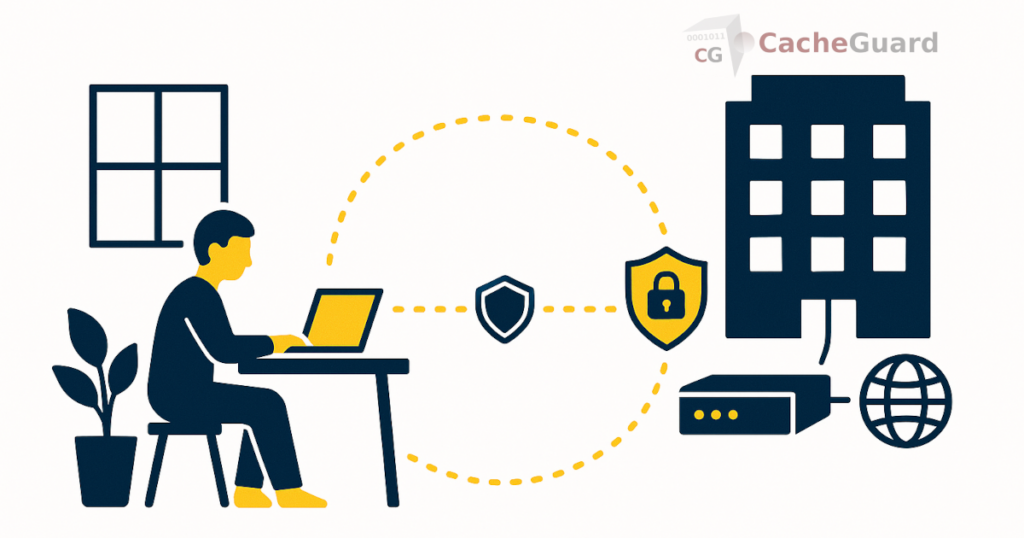
The Home Office Network: The Security Gap Nobody Fixes
Most remote work security guidance focuses on the endpoint — the device the employee is using. Install antivirus. Enable disk encryption. Use a password manager. Apply OS updates. This advice is correct and necessary. But it ignores the network the device is connected to.
A home router provides basic NAT — it translates between the private home network and the public internet. It does not inspect web traffic. It does not scan downloads for malware. It does not filter URLs. It does not log what devices on the home network are accessing. It has no concept of acceptable use policies. Whatever security the gateway provides in the office environment simply does not exist at home.
This matters because many threats enter through the network layer, not the endpoint. A malicious download that would be caught by a gateway antivirus engine at the office reaches the employee’s device uninspected when they are working from home. A phishing site that would be blocked by URL filtering in the office loads normally on the home network. The device’s endpoint antivirus is the last line of defense — and it is the only line.
Network Security for Remote Workers: The VPN Approach
A VPN (Virtual Private Network) creates an encrypted tunnel between the remote worker’s device and a VPN server. When all traffic is routed through this tunnel — not just traffic to internal company resources — the device’s internet connection effectively runs through the VPN server’s network. Whatever security controls exist on that server’s network apply to the remote worker’s browsing as if they were in the office.
This is the key insight that most remote work security articles miss. A VPN is not just about encrypting the connection between an employee and company resources. When configured to route all traffic through the tunnel, it is about making the remote worker’s entire network activity subject to the same gateway-level security controls that apply in the office. The home network becomes irrelevant — traffic flows through the tunnel to the office gateway, where it is inspected, filtered, and scanned before reaching the internet.
Self-Hosted VPN: The Right Choice for Network Security for Remote Workers
A commercial VPN service routes your traffic through a third-party provider’s servers. It encrypts the connection but applies no security controls — no antivirus, no URL filtering, no content inspection. It simply changes your apparent IP address and prevents interception on the local network.
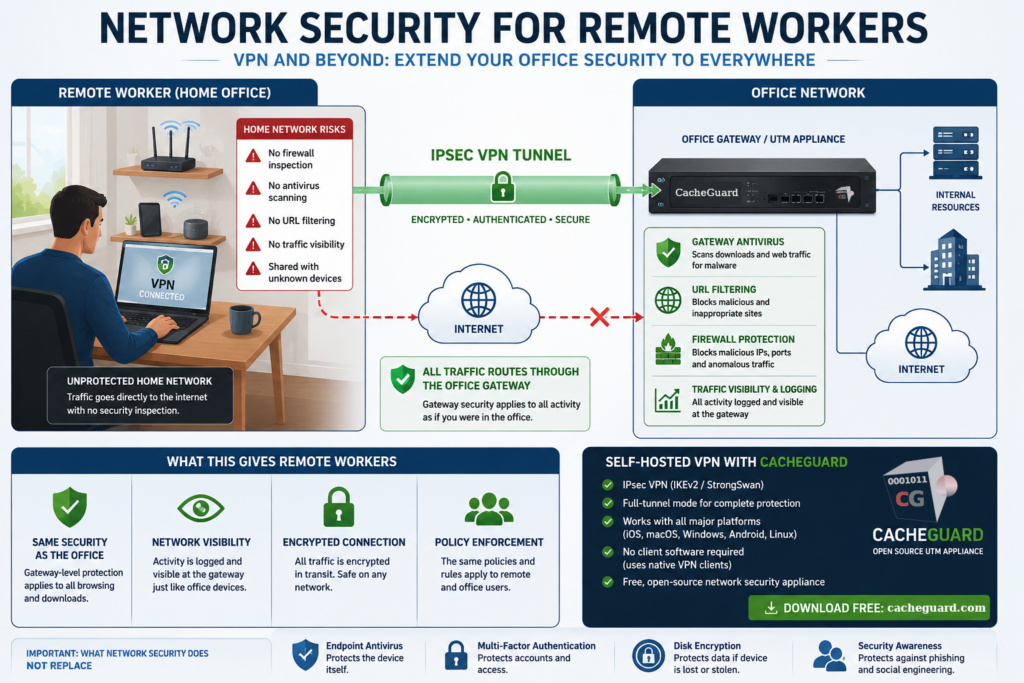
A self-hosted VPN server at your office is fundamentally different. Traffic tunnels from the remote worker’s device to your office gateway. On arrival, it is subject to the same gateway antivirus, URL filtering, firewall rules, and SSL inspection that apply to traffic generated in the office. The remote worker gains network-level security equivalent to being physically present at the office, without any additional software beyond the VPN client that is natively built into every major operating system.
For a detailed technical breakdown of how IPsec VPN tunnels work, see our guide to IPsec and our guide to setting up a self-hosted VPN server.
What Network Security Controls Remote Workers Gain Through the VPN
Once a remote worker’s traffic routes through the office VPN tunnel, the following gateway-level protections apply automatically — no configuration required on the remote device.
Gateway Antivirus: Network Security That Follows Remote Workers
Web traffic passing through the office gateway is scanned by the gateway antivirus engine before delivery to the requesting device. A malicious download that would reach a remote worker’s device uninspected on their home network is caught at the gateway — the same interception point that protects office workers. The device’s endpoint antivirus is still active as a second layer, but the gateway catches threats before they arrive.
URL filtering
The same URL filtering policies that apply to office users apply to remote workers connected via VPN. Malicious domains, phishing sites, and blocked content categories are filtered at the gateway before any content reaches the device. Time-based and group-based policies apply exactly as they would in the office.
Firewall protection
The office gateway’s firewall rules govern what traffic is allowed through. Outbound connections to known malicious IP ranges, unusual port usage, and other anomalous traffic patterns are blocked at the gateway regardless of whether the request originates from an office machine or a remote worker’s home device connected via VPN. This layer does not exist on any home router.
Traffic visibility
When remote workers are connected via VPN, their traffic is visible at the office gateway — the same logs that show office device activity. Unusual behavior, unexpected outbound connections, or access attempts to blocked categories are logged at the gateway and available for review. Without VPN, a remote worker’s activity is invisible to the organization.
Setting Up Network Security for Your Remote Workers: What You Need
Implementing the VPN approach for network security for remote workers requires a VPN server running at your office gateway. The VPN server generates client configuration profiles — one per device or per user — that employees import into their device’s native VPN client. No additional app installation is required: iOS, macOS, Windows, Android, and Linux all have native IPsec VPN clients built in.
For the gateway-level security to apply to all remote worker traffic (not just traffic to internal resources), the VPN must be configured in full-tunnel mode — routing all traffic through the tunnel rather than only traffic destined for internal IP ranges. Split-tunnel mode, where only internal traffic goes through the VPN and direct internet traffic bypasses it, does not extend gateway security to remote browsing.
As we discussed in our article on why endpoint-only security is insufficient, the network layer provides protections that endpoint tools cannot replicate. A VPN that extends the office network to remote workers is the most practical way to give remote employees network-level security equivalent to being in the office.
What Remote Worker Network Security Cannot Replace on Its Own
Being honest about what a gateway VPN does and does not cover is important. The following controls are genuinely necessary for remote workers and are not provided by a network gateway:
- Endpoint antivirus. The gateway antivirus engine scans web traffic — it does not scan files already on the device, email attachments opened in a local client, or threats introduced via USB. Each remote worker’s device needs its own endpoint antivirus.
- Multi-factor authentication. MFA on company email, cloud applications, and any system with a login should be enabled regardless of VPN. A compromised password is a credential problem, not a network problem.
- Disk encryption. If a laptop is lost or stolen, full-disk encryption protects the data on it. This is device-level protection that operates independently of network security.
- Security awareness. Phishing attacks that arrive via email and target the user directly bypass network-level controls. Employee awareness training remains essential.
Network security for remote workers via a gateway VPN is one layer in a complete security posture — a significant one that addresses the home network gap, but not a replacement for endpoint and access controls.
Implementing This With CacheGuard
A dedicated network security appliance at your office handles both the VPN server and the gateway security stack in a single device. Remote workers connect to it via IPsec VPN; their traffic flows through its firewall, gateway antivirus, and URL filtering on the way to the internet.
CacheGuard is a free, open-source network security appliance that implements IPsec VPN using IKEv2 with StrongSwan — the same battle-tested VPN engine used in enterprise environments worldwide. It generates ready-to-import client configuration profiles for iOS, macOS, Windows, Android, and Linux, and handles dynamic home office IP addresses via built-in DynDNS support. All gateway-level security features — antivirus, URL filtering, firewall, SSL inspection — are part of the same integrated UTM appliance that serves as the office network gateway.
For organizations with BYOD environments, the same VPN approach that protects company-owned remote devices also applies to personal devices — extending network-level security to every device an employee uses to access company resources, regardless of ownership.
You can download CacheGuard for free from the official website. It installs from a single ISO image on any standard x86 machine or virtual machine, and is configured through a browser-based web interface.
Want to go deeper? Read our guide to setting up a self-hosted VPN server for a complete deployment walkthrough, or our guide to IPsec for a technical breakdown of how VPN tunnels work. Ready to get started? Download CacheGuard for free and have your remote workers protected today.
Questions about deploying CacheGuard? Visit the community forum at help.cacheguard.net or browse the full documentation at CacheGuard Documentation.
