

If you have been researching VPNs or network security, you have probably come across the term IPsec. But what is IPsec exactly, how does it work, and why does it matter for your organization’s security?
This guide explains the protocol in plain language — covering what it is, how it protects your network traffic, the different modes it operates in, and how it compares to other VPN protocols.
What Is IPsec?
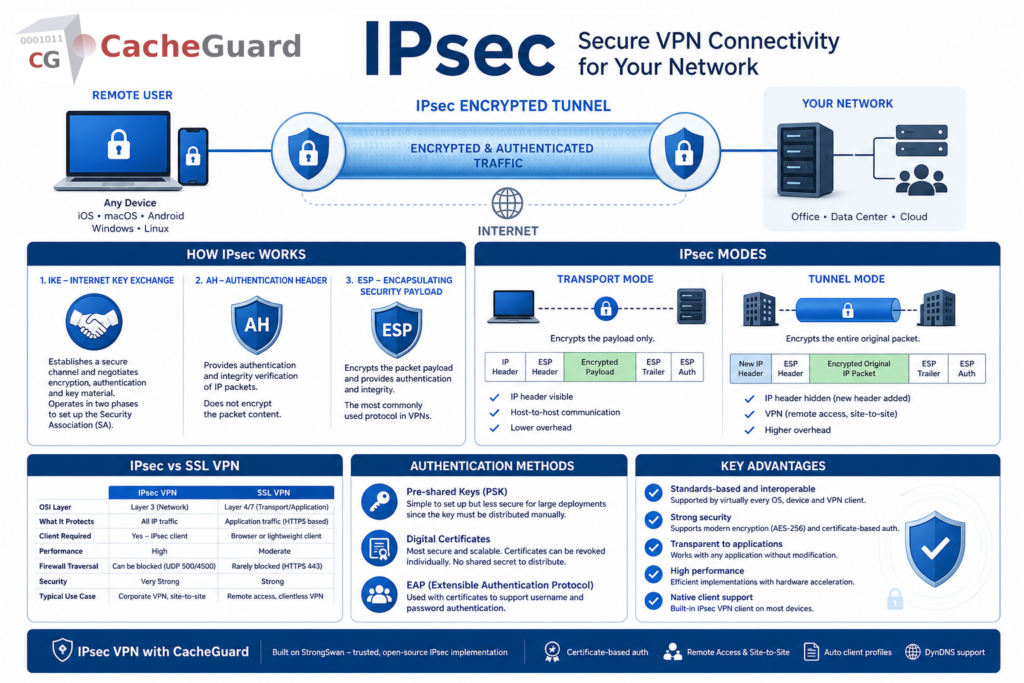
IPsec — short for Internet Protocol Security — is a suite of protocols designed to secure communications over IP networks by authenticating and encrypting every packet of data sent over a connection. It operates at the network layer (Layer 3 of the OSI model), meaning it protects all traffic at the IP level regardless of which application or protocol generates it.
Unlike application-level encryption — such as HTTPS, which only encrypts traffic for a specific application — this protocol secures all traffic passing through the protected connection. This makes it one of the most comprehensive and widely deployed security protocols for VPNs and network-to-network connectivity.
Developed in the 1990s as part of the IPv6 standard and later backported to IPv4, it is today the foundation of the majority of enterprise and business VPN deployments worldwide.
What Is IPsec Used For?
Understanding what is IPsec requires understanding the problems it solves. The protocol is primarily used for:
Remote Access VPN
IPsec allows remote employees to connect securely to a company network over the internet. The employee’s device establishes an encrypted tunnel to the company’s VPN server — all traffic between the device and the network travels through this tunnel, protected from interception.
Site-to-Site VPN
IPsec connects two geographically separate networks — for example a branch office and a headquarters — over the public internet as if they were directly connected. All traffic between the two sites travels through an encrypted tunnel, invisible to anyone on the internet between them.
Network Traffic Encryption
The protocol can encrypt all traffic between two hosts or two networks, protecting sensitive communications from interception even on untrusted networks.
Authentication Without Encryption
It can also be used in authentication-only mode — verifying the origin and integrity of packets without encrypting their content. This is useful in environments where performance is critical and the underlying network is already trusted.
How Does IPsec Work?
IPsec achieves its security through two main protocols and a key exchange mechanism working together.
IKE — Internet Key Exchange
Before any protected data can flow, the two parties must agree on how to encrypt and authenticate the connection. IKE — Internet Key Exchange — is the protocol that handles this negotiation. It establishes a Security Association (SA) between the two parties, agreeing on encryption algorithms, authentication methods and key material.
IKE operates in two phases. In phase 1 it establishes a secure channel between the two parties. In phase 2 it negotiates the parameters for the actual IPsec tunnel that will carry the protected data.
AH — Authentication Header
The Authentication Header protocol provides authentication and integrity verification for IP packets. It ensures that packets have not been tampered with in transit and that they genuinely originate from the claimed source. AH does not encrypt the packet content — it only verifies its authenticity and integrity.
ESP — Encapsulating Security Payload
ESP is the protocol that provides both encryption and authentication. It encrypts the packet payload — making the content unreadable to anyone intercepting the traffic — and also provides authentication to verify the packet’s origin and integrity. In most VPN deployments ESP is used rather than AH because it provides both encryption and authentication in a single protocol.
What Is IPsec: Transport Mode vs Tunnel Mode
IPsec operates in two distinct modes depending on the use case:
Transport Mode
In transport mode, the protocol encrypts only the payload of each IP packet — the data — while leaving the IP header visible. This mode is used for host-to-host communication where the two endpoints are the actual parties communicating.
Transport mode is typically used for securing communications between two specific hosts on the same network — for example between a workstation and a server.
Tunnel Mode
In tunnel mode, the entire original IP packet — header and payload — is encrypted and wrapped in a new IP packet with its own header. This mode is used for VPN connections where traffic from one network needs to travel securely across another network to reach a different network.
Tunnel mode is the standard for both remote access VPN and site-to-site VPN deployments. The original packet — including its source and destination IP addresses — is completely hidden from anyone on the network between the two VPN endpoints.
| Transport Mode | Tunnel Mode | |
|---|---|---|
| What is encrypted | Payload only | Entire original packet |
| IP header visible | Yes | No — new header added |
| Typical use case | Host-to-host | VPN — remote access and site-to-site |
| Overhead | Lower | Higher |
What Is IPsec vs SSL VPN?
One of the most common questions when researching VPN technology is the difference between IPsec and SSL VPN. Both are widely used — but they work differently and suit different use cases.
| IPsec VPN | SSL VPN | |
|---|---|---|
| OSI layer | Layer 3 — network | Layer 4/7 — transport/application |
| What it protects | All IP traffic | Application traffic (HTTPS based) |
| Client required | Yes — IPsec client | Browser or lightweight client |
| Performance | High | Moderate |
| Firewall traversal | Can be blocked (UDP 500/4500) | Rarely blocked (uses HTTPS port 443) |
| Security | Very strong | Strong |
| Typical use case | Corporate VPN, site-to-site | Remote access, clientless VPN |
IPsec is generally considered the stronger protocol for full network VPN deployments — it protects all traffic at the network level and delivers excellent performance. SSL VPN is more flexible for remote access scenarios where firewall traversal is a concern, since it typically uses port 443 which is rarely blocked.
CacheGuard — a free, open-source network security appliance — implements IPsec VPN using the ESP protocol in tunnel mode as a built-in feature, providing robust, standards-based VPN connectivity for remote access and site-to-site deployments. For a deeper comparison of the two protocols, read our dedicated article on IPsec vs SSL VPN.
What Is IPsec Authentication?
IPsec supports several methods for authenticating the parties in a VPN connection:
Pre-shared keys (PSK) — both parties share a secret password configured in advance. Simple to set up but less secure for large deployments since the key must be distributed and managed manually.
Digital certificates — each party has its own certificate issued by a Certificate Authority (CA). This is the most secure and scalable authentication method — certificates can be revoked individually if a device is compromised, and there is no shared secret to distribute. CacheGuard uses certificate-based authentication for its VPN, generating a root CA and individual device certificates through its web interface.
EAP — Extensible Authentication Protocol — used in combination with certificates to support username and password authentication alongside certificate-based device authentication.
What Is IPsec: Key Advantages
IPsec has remained the dominant VPN protocol for enterprise and business deployments for decades for good reasons:
Standards-based and interoperable. IPsec is an open standard supported by virtually every operating system, network device and VPN client. iOS, macOS, Android, Windows and Linux all include native IPsec support — no third-party client required.
Strong security. IPsec supports modern encryption algorithms including AES-256, and strong authentication through digital certificates. It has been extensively analyzed and battle-tested over decades of deployment.
Transparent to applications. Because IPsec operates at the network layer, it is completely transparent to applications. Any application — email, file sharing, video conferencing, database access — works through an IPsec VPN without any modification.
High performance. IPsec is implemented efficiently in most operating systems and network devices. Modern hardware acceleration makes it suitable for high-throughput deployments.
Native client support. Most devices include a built-in IPsec VPN client, eliminating the need to install and maintain third-party software on every endpoint.
What Is IPsec: Key Limitations
Firewall traversal can be challenging. IPsec uses UDP ports 500 and 4500 for IKE negotiation and NAT traversal. Some firewalls and network configurations block these ports, which can prevent IPsec connections from being established. SSL VPN — which uses port 443 — is less likely to be blocked in restrictive environments.
Complex configuration. Compared to some newer VPN protocols, IPsec can be complex to configure correctly. Certificate management, IKE phase negotiation parameters and encryption algorithm selection all require careful attention.
NAT compatibility. IPsec was originally designed before NAT (Network Address Translation) was widespread. NAT-Traversal (NAT-T) was added to handle this but can add complexity in some network configurations.
IPsec in CacheGuard
CacheGuard implements IPsec VPN using the ESP protocol in tunnel mode as a built-in feature of its free, open-source network security appliance — powered by StrongSwan, one of the most widely deployed and trusted open-source IPsec implementations. ESP in tunnel mode provides both encryption and authentication while completely hiding the original IP packet, making it the most secure and appropriate choice for VPN deployments.
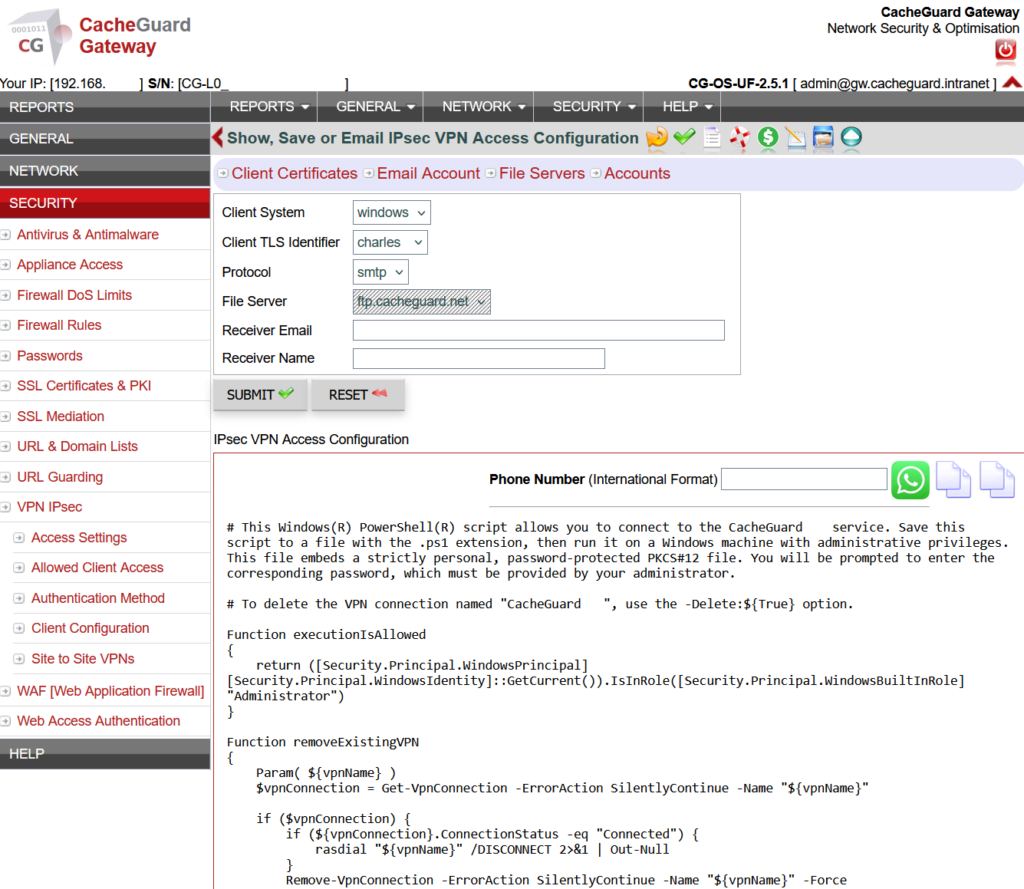
CacheGuard’s IPsec VPN supports:
- Certificate-based authentication with automatic CA and client certificate generation
- Pre-shared key (PSK) authentication as an alternative to certificates
- Remote access VPN for individual devices — iOS, macOS, Android, Windows and Linux
- Site-to-site VPN for connecting multiple networks
- Ready-to-use client configuration profiles generated automatically for each device
- DynDNS integration for deployments without a fixed public IP address
Setting up an IPsec VPN server with CacheGuard takes less than two hours — including certificate generation, VPN server configuration and client profile distribution. For a complete step-by-step guide, read our article on building your own free VPN server at home with CacheGuard.
Conclusion
IPsec is the gold standard for secure VPN connectivity — a mature, standards-based protocol that protects all IP traffic through strong encryption and authentication, supported natively by virtually every operating system and device.
For small businesses and startups that need a VPN server, IPsec delivers enterprise-grade security without enterprise complexity — especially when deployed through a free, integrated UTM appliance like CacheGuard.
Download CacheGuard for free and have your IPsec VPN server up and running in under two hours.
Questions about deploying CacheGuard? Visit the community forum at help.cacheguard.net or browse the full documentation at CacheGuard Documentation.
