
UTM for Startups: How to Secure Your Network Without Breaking the Bank
If you are building a startup, network security is probably not at the top of your priority list. You are focused on your product, your customers, and your growth. But the moment your startup handles customer data, processes payments, or connects remote employees, you need a UTM for startups that protects your infrastructure — before something goes wrong.

This guide explains what a UTM is, why startups need one, and how to choose the right solution without spending a fortune.
What Is a UTM for Startups?
A UTM, or Unified Threat Management appliance, is a single device or software solution that combines multiple network security functions into one. Instead of buying and managing separate tools for your firewall, VPN, antivirus, and web filtering, a UTM handles all of it together.
A typical UTM for startups includes:
- A firewall to control incoming and outgoing network traffic
- A VPN server to allow your remote team to connect securely
- A web antivirus to block malware before it reaches your devices
- A URL filter to prevent access to malicious or inappropriate websites
- A WAF (Web Application Firewall) to protect your web applications from attacks
- QoS (Quality of Service) to prioritize critical traffic on your network
Managing all of these separately would require significant expertise and budget. A UTM brings them together in one place, which makes it the ideal choice for a startup that does not have a dedicated IT security team.
Why Startups Need a UTM Solution
Many startup founders believe that cyber threats only target large enterprises. This is a dangerous misconception. According to multiple cybersecurity reports, small and medium businesses are increasingly targeted precisely because they tend to have weaker defenses.
Here is why investing in a UTM for startups makes sense from day one:
You handle sensitive data from the start. Even before you reach significant scale, you are likely collecting email addresses, payment information, or personal data from your users. A single breach can destroy customer trust and expose you to legal liability.
Remote work is the norm. Most startups have distributed teams. Without a VPN and proper network controls, remote employees connecting over public or home networks are a security risk you cannot afford to ignore.
Compliance requirements arrive sooner than you think. If you operate in Europe, GDPR applies to you from your first user. A UTM helps you demonstrate that you have technical security measures in place — which is a legal requirement under GDPR.
The cost of a breach far exceeds the cost of prevention. Downtime, data recovery, legal fees, and reputational damage from a cyberattack will cost your startup far more than implementing proper security upfront.
What to Look for in a Startup UTM Solution
Not all UTM solutions are built with startups in mind. Enterprise products like FortiGate or Cisco Meraki offer excellent protection, but they come with five-figure price tags and require specialized expertise to manage. That is simply not realistic for most startups.
When evaluating a UTM for startups, look for the following:
1. All-in-one coverage for startup networks
You want firewall, VPN, antivirus, URL filtering, WAF, and QoS in a single solution. Adding plugins or separate products for each feature quickly becomes expensive and complicated to manage.
2. Easy setup and management
Your team should be able to set up and manage the UTM without being network security experts. Look for solutions with a clear web interface and good documentation.
3. Affordable unified threat management pricing
Enterprise UTM solutions are priced for enterprise budgets. A startup-friendly UTM should be either free and open source, or available at a predictable, low monthly cost.
4. Scalability
Your network will grow. Your UTM should be able to grow with it, supporting more users and more traffic without requiring you to switch solutions.
5. Active development and support
Network security threats evolve constantly. Choose a UTM that is actively maintained and regularly updated.
CacheGuard: A Free Open-Source UTM for Startups
CacheGuard is a free, open-source UTM designed specifically for organizations that need enterprise-grade protection without the enterprise price tag. It is an ideal UTM for startups that are setting up their network security for the first time.
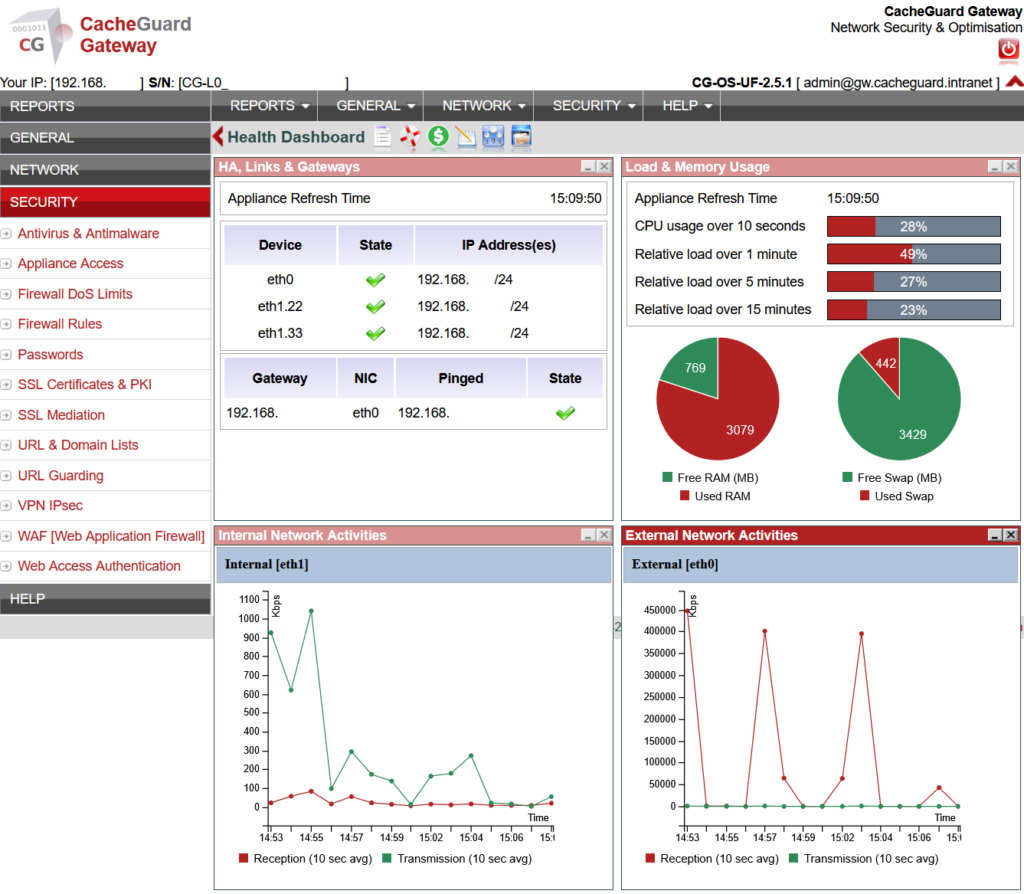
CacheGuard-OS turns any standard x86 machine or virtual machine into a full network security appliance. It includes a firewall, VPN server, web antivirus, URL filtering, SSL inspection, WAF, reverse proxy, load balancer, and QoS — all integrated into a single ISO that you can install in under an hour.
Unlike pfSense or OPNsense, which require significant technical knowledge and additional plugins to reach feature parity, CacheGuard works out of the box. You install it, configure your network settings through the web interface, and you are protected.
CacheGuard is completely free to use, regardless of the number of users. Optional paid support plans are available for startups that want guaranteed response times and expert assistance.
You can learn more and download CacheGuard at cacheguard.com.
How to Deploy a UTM for Startups: A Simple Step-by-Step Plan
Here is a practical approach to deploying a UTM for startups without disrupting your operations:
Step 1: Assess your network. Map out what you have — how many users, how many offices or remote workers, what servers or web applications you run. This will determine what UTM features matter most to you.
Step 2: Choose your hardware or VM. A UTM can run on a dedicated physical machine or as a virtual machine in your existing infrastructure. For most startups, a VM is the easiest starting point.
Step 3: Install and configure. With an open-source solution like CacheGuard, you download the ISO, install it, and follow the setup wizard. Basic configuration takes under an hour.
Step 4: Enable features progressively. Start with the firewall and VPN. Then enable web antivirus and URL filtering. Add the WAF if you run web applications. Enable QoS if bandwidth management is a concern.
Step 5: Monitor and update. Once deployed, check your logs regularly and keep your UTM updated. Security is not a one-time setup — it is an ongoing process.
Conclusion
Network security is not optional for startups. It is a foundation you need to build early, before a breach forces your hand. A UTM for startups gives you comprehensive protection in a single, manageable solution — without requiring a dedicated security team or an enterprise budget.
Whether you choose a commercial appliance or a free open-source solution like CacheGuard, the important thing is to act before you need to. Your customers, your data, and your reputation depend on it.
Have questions about deploying CacheGuard in your startup? Visit cacheguard.com or join the community forum at help.cacheguard.net.