

If you run a web application, an API or any internet-facing service, you have probably come across the term reverse proxy. But what is a reverse proxy exactly, how does it work, and why should your organization consider deploying one?
This guide explains reverse proxies in plain language — what they are, what they do, how they differ from regular proxies, and why they are an essential component of modern network security.
What Is a Reverse Proxy?
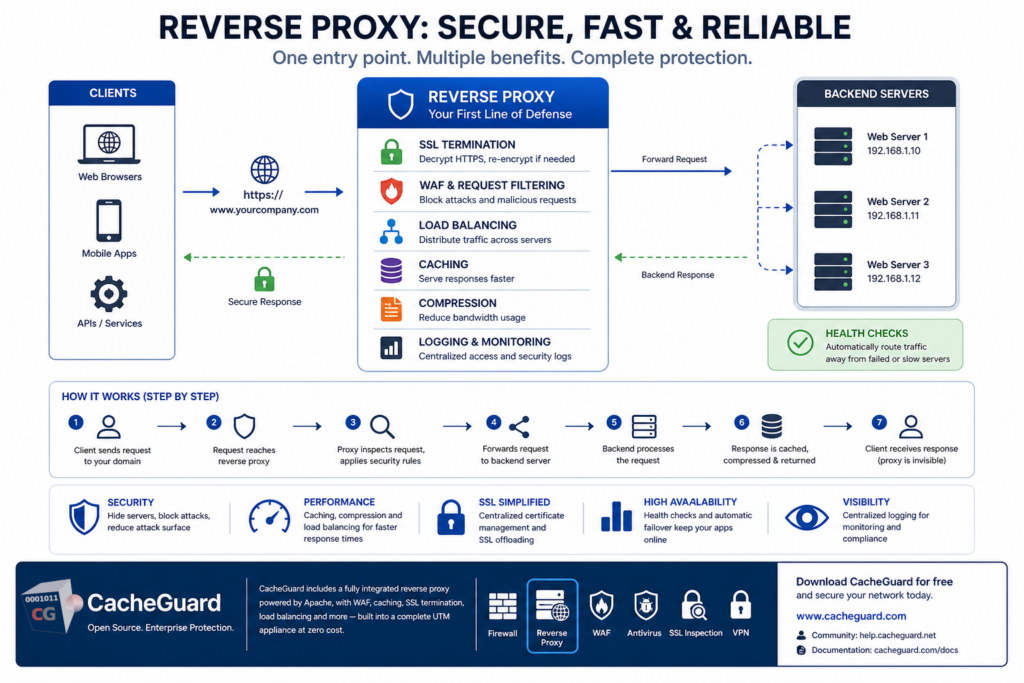
A reverse proxy is a server that sits in front of one or more web servers and intercepts requests from clients before they reach those servers. Rather than clients connecting directly to your web server, they connect to it — which then forwards the request to the appropriate backend server, retrieves the response, and sends it back to the client.
From the client’s perspective, they are communicating directly with the website or application. They have no visibility into the backend infrastructure behind it. This is the defining characteristic of a reverse proxy — it acts on behalf of the server, not the client.
What Is a Reverse Proxy vs a Forward Proxy?
Understanding what is a reverse proxy is easier when you contrast it with a forward proxy — the more commonly known type.
A forward proxy sits in front of clients and acts on their behalf. When a user on your network requests a website, it makes that request on the user’s behalf. The website sees the proxy’s IP address, not the user’s. Forward proxies are commonly used for content filtering, web caching and anonymous browsing.
A reverse proxy sits in front of servers and acts on their behalf. When a client requests your website, it handles that request on the server’s behalf. The client sees the proxy’s IP address, not the server’s. This type of proxy is used for security, load balancing, SSL termination and caching.
| Forward Proxy | Reverse Proxy | |
|---|---|---|
| Sits in front of | Clients | Servers |
| Acts on behalf of | Clients | Servers |
| Client sees | Proxy IP | Proxy IP |
| Server sees | Proxy IP | Proxy IP |
| Typical use | Content filtering, anonymity | Security, load balancing, caching |
What Is a Reverse Proxy Used For?
A reverse proxy serves multiple important functions in a modern network architecture.
Security and Attack Surface Reduction
By placing a reverse proxy in front of your web servers, you hide the actual IP addresses and server details of your backend infrastructure from the internet. Attackers cannot directly target your web servers — they can only interact with it. This significantly reduces your attack surface.
It can also integrate with a Web Application Firewall to inspect and filter incoming requests, blocking malicious traffic before it ever reaches your application.
SSL Termination
A reverse proxy can handle SSL/TLS encryption and decryption on behalf of your backend servers — a function called SSL termination. Rather than each individual web server managing its own SSL certificate and performing computationally expensive encryption operations, it handles all of it centrally.
This simplifies certificate management — you only need to manage certificates in one place rather than on every backend server — and reduces the computational load on your application servers.
Load Balancing
When your application runs on multiple backend servers, a reverse proxy can distribute incoming requests across those servers based on configurable rules. This ensures that no single server is overwhelmed, improves response times, and provides redundancy — if one server fails, traffic is automatically routed to the remaining healthy servers.
Caching
A reverse proxy can cache responses from your backend servers and serve them directly to subsequent clients without forwarding the request to the backend. This dramatically reduces the load on your web servers and improves response times for frequently accessed content.
For static content — images, stylesheets, scripts — caching at the reverse proxy level can serve hundreds of requests per second without touching the backend server at all.
Compression
A reverse proxy can compress responses before sending them to clients, reducing bandwidth usage and improving page load times — particularly for clients on slow connections.
High Availability
By monitoring the health of backend servers and automatically routing traffic away from failed or slow servers, it provides high availability for your web applications without requiring changes to client configuration.
However a reverse proxy can itself become a single point of failure (SPOF) — if it goes down, all web traffic is interrupted. To address this, CacheGuard integrates a high availability mode that allows you to deploy two or more reverse proxy appliances in HA configuration. If one appliance fails, the others automatically take over and continue handling web requests, ensuring service continuity with no manual intervention required.
How It Works Step by Step
Here is what happens when a client makes a request through a reverse proxy:
- A client sends a request to your domain — for example
https://www.yourcompany.com - The request reaches your reverse proxy rather than your web server directly
- It inspects the request — checking for malicious patterns, applying WAF rules, verifying SSL
- It forwards the legitimate request to the appropriate backend server
- The backend server processes the request and sends the response back
- The response is optionally cached, compressed and forwarded to the client
- The client receives the response — unaware that a reverse proxy was involved
Its Role in Network Security
From a security perspective, a reverse proxy is one of the most effective tools for protecting web applications. It provides several layers of protection that complement your firewall and other network security controls.
IP address hiding. Your backend servers’ real IP addresses are never exposed to the internet. Even if an attacker discovers a vulnerability in your application, they cannot directly target the server that runs it.
DDoS mitigation. A reverse proxy can absorb and filter DDoS traffic before it reaches your backend servers, keeping your application available even under heavy attack.
Request filtering. Integrated with a WAF, it can inspect every incoming request and block SQL injection attempts, cross-site scripting payloads, directory traversal attacks and other malicious requests before they reach your application code.
Rate limiting. It can limit the number of requests from a single IP address, protecting your application from brute force attacks and automated scanning.
Centralized logging. All traffic passes through it, making it the ideal point for centralized access logging and security monitoring.
Reverse Proxy vs Load Balancer: What Is the Difference?
These two terms are often confused because modern reverse proxies typically include load balancing functionality. The distinction is:
A load balancer distributes traffic across multiple backend servers to optimize performance and availability. It focuses on the distribution of requests. A pure load balancer can handle multiple protocols — TCP, UDP, HTTP, HTTPS and others — making it suitable for load balancing any type of network service.
A reverse proxy does everything a load balancer does — plus SSL termination, caching, compression, request filtering and security functions. It focuses on the full lifecycle of a request. However it operates specifically on HTTP and HTTPS traffic on both its front and internal interfaces, making it the ideal choice for web application deployments but not a substitute for a pure load balancer in environments that need to balance non-HTTP traffic.
In practice, most organizations running web applications deploy one that includes load balancing rather than a dedicated load balancer, since the additional security and performance functions come at no extra cost.
Reverse Proxy in CacheGuard
CacheGuard includes a fully integrated reverse proxy as a built-in feature of its free, open-source network security appliance — powered by Apache, one of the most widely deployed and trusted web server platforms in the world.
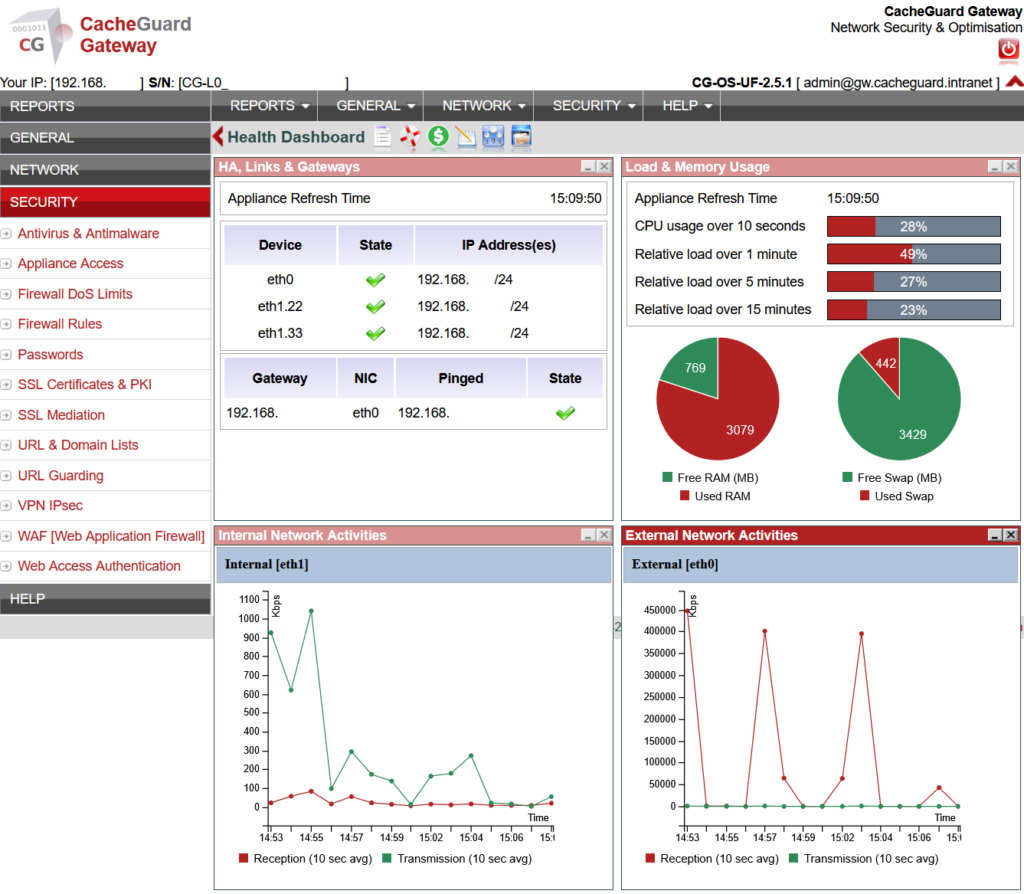
The built-in solution includes:
- SSL termination — handle HTTPS certificates centrally for all your backend servers
- Load balancing — distribute traffic across multiple backend servers with configurable rules
- WAF integration — all incoming traffic is inspected by ModSecurity and the OWASP Core Rule Set
- Web caching — cache responses from backend servers to reduce load and improve performance
- Compression — compress responses automatically to reduce bandwidth usage
- Access logging — centralized logging of all requests for security monitoring and analysis
Because it is integrated into a complete UTM appliance, it works alongside the firewall, web antivirus, SSL inspection and VPN — providing layered protection for your web applications without requiring a separate deployment or additional licensing.
Full configuration instructions are available in the CacheGuard User’s Guide. Note that while the User’s Guide describes basic configuration using the CLI, all settings can equally be configured through the Web GUI.
Conclusion
A reverse proxy is not just a performance optimization tool — it is a critical security component for any organization running web-facing applications. By hiding your backend infrastructure, terminating SSL centrally, filtering malicious requests and distributing load across servers, it significantly strengthens your security posture while improving the reliability and performance of your applications.
With CacheGuard, you get one fully integrated into a complete network security stack — at zero cost.
Download CacheGuard for free and have your reverse proxy and complete network security stack up and running in under an hour.
Questions about deploying CacheGuard? Visit the community forum at help.cacheguard.net or browse the full documentation at CacheGuard Documentation.
