
What Is a WAF? Web Application Firewall Explained
If you run a website, a web application, an API or an online store, you have probably heard the term WAF mentioned in the context of security. But what is a WAF exactly, how does it work, and does your business actually need one?
This guide answers all of those questions in plain language — no prior security expertise required.
What Is a WAF?
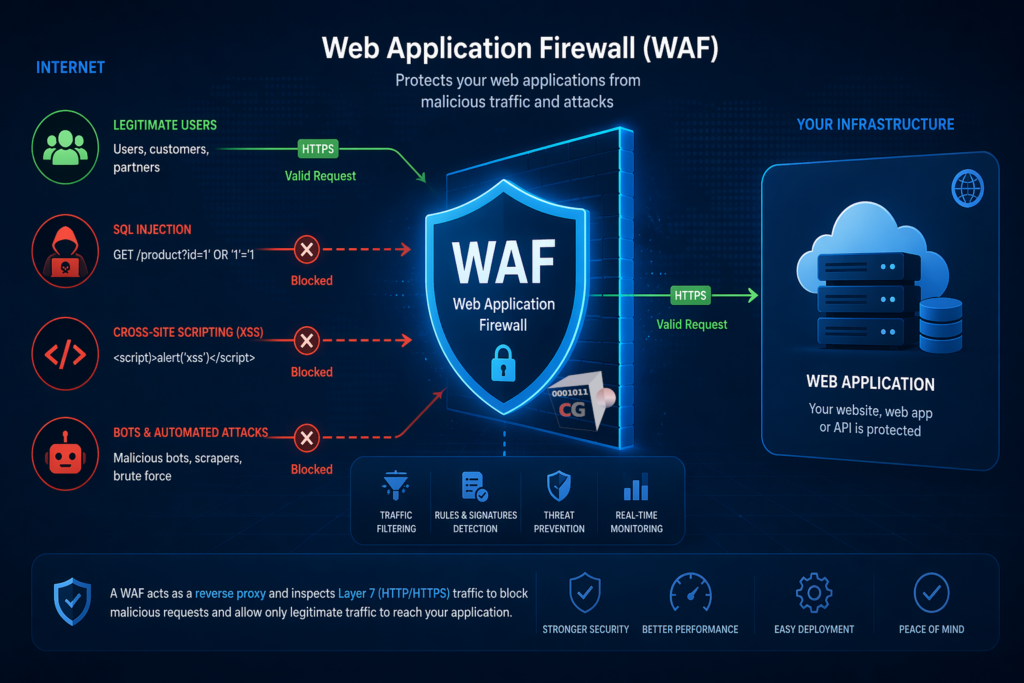
A WAF, or Web Application Firewall, is a security tool that monitors, filters and blocks HTTP and HTTPS traffic between the internet and your web applications. It sits in front of your web server and inspects every request that comes in, blocking malicious traffic before it reaches your application.
Think of a WAF as a security guard standing at the entrance of your web application. Every visitor has to pass through the guard before they can interact with your site. Legitimate visitors get through without any problem. Attackers carrying malicious payloads get stopped at the door.
A WAF operates at the application layer — Layer 7 of the OSI model — which means it understands the content of web requests, not just their source and destination. This is what distinguishes it from a traditional network firewall, which operates at a lower level and cannot see inside web traffic.
What Is a WAF Protecting You From?
A WAF is specifically designed to protect web applications from a well-known set of attack techniques. The most common threats a WAF defends against include:
SQL injection attacks
SQL injection is one of the most common and dangerous web application vulnerabilities. An attacker sends malicious SQL code inside a web request — for example in a login form or a search field — hoping that your application will execute it against your database. A successful SQL injection attack can expose all your customer data, allow attackers to bypass authentication, or even delete your entire database.
A WAF detects and blocks SQL injection attempts before they reach your application.
Cross-site scripting (XSS)
Cross-site scripting attacks inject malicious JavaScript code into web pages that other users then load in their browsers. This can be used to steal session cookies, redirect users to malicious sites, or perform actions on behalf of the victim without their knowledge.
A WAF identifies and blocks XSS payloads in incoming requests.
Cross-site request forgery (CSRF)
CSRF attacks trick authenticated users into performing unintended actions on a web application — for example transferring funds or changing account settings — without their knowledge.
Directory traversal
Attackers use directory traversal techniques to access files and directories outside the intended web root — potentially exposing sensitive system files, configuration files or credentials.
Remote file inclusion and code injection
These attacks attempt to include or execute malicious code on your web server by manipulating parameters in web requests.
Bad bots and scrapers
WAFs can identify and block malicious bots that scrape your content, abuse your APIs or probe your application for vulnerabilities.
How Does a WAF Work?
Understanding what is a WAF requires understanding how it inspects and filters traffic. Most WAFs work using one or more of the following approaches:
Signature-based detection compares incoming requests against a database of known attack patterns. When a request matches a known attack signature it is blocked. This approach is fast and effective against known threats but may miss novel attack techniques.
Anomaly-based detection establishes a baseline of normal traffic behavior and flags requests that deviate significantly from that baseline. This is more effective against unknown threats but can generate false positives if not tuned correctly.
Positive security model defines exactly what valid requests look like and blocks everything else. This is the most secure approach but requires careful configuration to avoid blocking legitimate traffic.
Most modern WAFs combine all three approaches for the best balance of security and usability.
What Is a WAF vs a Traditional Firewall?
This is one of the most common points of confusion. A traditional network firewall and a WAF serve different purposes and operate at different levels of your network stack.
| Traditional Firewall | WAF | |
|---|---|---|
| OSI layer | Layer 3 and 4 (network and transport) | Layer 7 (application) |
| What it inspects | IP addresses, ports, protocols | HTTP and HTTPS request content |
| What it protects | Network perimeter | Web applications |
| Blocks | Unauthorized network access | Web application attacks |
| Understands web traffic | ❌ | ✅ |
A traditional firewall controls who can connect to your network. A WAF controls what those connections can do when they interact with your web applications. Both are necessary — they complement rather than replace each other.
Do You Need a WAF for Your Business?
The short answer is: if you run any web-facing application, yes.
Here are the situations where a WAF is not optional:
You run an ecommerce store. Online stores are among the most targeted web applications because they handle payment data and personal information. A WAF protects your checkout process, your customer accounts and your product database from attacks.
You have a customer portal or login page. Any application with authentication is a target for session hijacking and other login-based attacks. A WAF adds a critical layer of protection in front of your login flows.
You expose an API. APIs are increasingly targeted by attackers who probe them for vulnerabilities, abuse rate limits, or attempt to extract data through malformed requests. A WAF can inspect and filter API traffic just as effectively as browser-based traffic.
You handle personal data. Under GDPR and other data protection regulations, you are legally required to implement appropriate technical measures to protect personal data. A WAF is one of the most important technical controls you can put in place.
You have a public-facing website. Even a simple informational website can be defaced, used to distribute malware, or exploited as a stepping stone to attack your internal network.
What Is a WAF: Deployment Options
WAFs can be deployed in several different ways depending on your infrastructure and requirements:
Network-based WAF is deployed as a hardware appliance or software on your network, sitting between your internet connection and your web servers. This is the most performant option and gives you full control over your data. CacheGuard includes a built-in network-based WAF as part of its all-in-one security appliance.
Host-based WAF is installed directly on the web server as a software module — for example ModSecurity for Apache or Nginx. This option is flexible and cost-effective but adds load to your web server and requires per-server configuration.
Cloud-based WAF is a service provided by a third party that sits in front of your web infrastructure in the cloud. Easy to set up but your traffic passes through a third party’s infrastructure, which raises privacy and data sovereignty concerns for some organizations.
For most small and medium businesses, a network-based WAF included in a UTM appliance like CacheGuard is the most practical option — it protects all your web applications simultaneously without requiring per-server configuration.
What Is a WAF in CacheGuard?
CacheGuard includes a fully integrated WAF as part of its free, open-source network security appliance. The CacheGuard WAF is powered by ModSecurity, the industry standard open-source WAF engine, and is pre-configured with the OWASP Core Rule Set — the most widely used set of WAF rules for protecting against the OWASP Top 10 vulnerabilities.
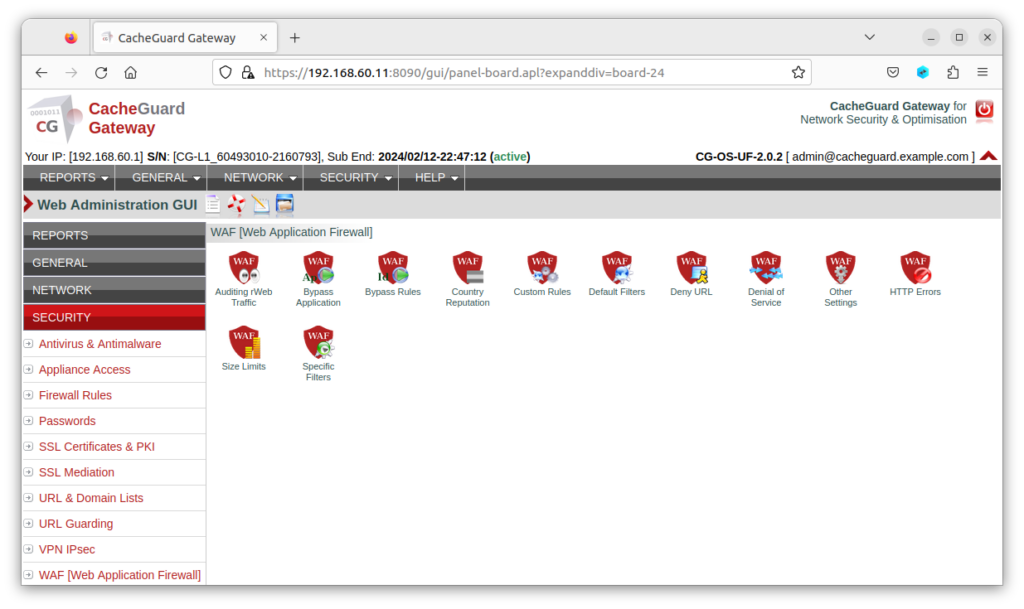
Because CacheGuard’s WAF is integrated into a complete UTM appliance, it works alongside the firewall, web antivirus, URL filtering and SSL inspection to provide layered protection for your web applications without requiring separate deployment or configuration.
Setting up WAF protection for your web applications with CacheGuard takes minutes — not days — and requires no prior WAF expertise.
Key Takeaways
- A WAF is a security tool that protects web applications by filtering and blocking malicious HTTP and HTTPS traffic
- It defends against SQL injection, XSS, CSRF, directory traversal and other web application threats
- It operates at Layer 7 and complements — not replaces — your traditional network firewall
- Any business running a web application, API, ecommerce store or customer portal needs a WAF
- CacheGuard includes a fully integrated, free WAF powered by ModSecurity and the OWASP Core Rule Set
Conclusion
Now that you know what is a WAF and why it matters, the next question is how to get one in place as quickly and cost-effectively as possible.
For most small businesses and startups, the answer is a WAF that is already integrated into your network security stack — one that works alongside your firewall, antivirus and URL filtering without requiring a separate deployment, a separate budget or specialist expertise to manage.
That is exactly what CacheGuard delivers — a complete, free, open-source network security appliance with a built-in WAF, ready to protect your web applications in under an hour.
Download CacheGuard for free and have your web applications protected in under an hour.
Questions about deploying CacheGuard? Visit the community forum at help.cacheguard.net or browse the full documentation at CacheGuard Documentation.