
Open Source Firewall for Small Business: The Complete Guide
Choosing the right open source firewall for small business is one of the most important decisions you can make for your company’s network security. Get it right and you have enterprise-grade protection at zero cost. Get it wrong and you end up with a complex, half-configured system that gives you a false sense of security while leaving real gaps in your defenses.
This guide covers everything you need to know — what an open source firewall is, why small businesses need one, what to look for when choosing, and which solutions are worth considering in 2026.
Why Small Businesses Need an Open Source Firewall
Many small business owners assume that firewalls are only for large enterprises with complex networks and dedicated IT teams. This assumption is dangerously wrong.
Small businesses are among the most frequently targeted victims of cyberattacks. Attackers know that small organizations typically have weaker defenses, less security expertise and fewer resources to respond to incidents. The consequences of a successful attack — data loss, downtime, regulatory fines, reputational damage — can be devastating for a company without the resources to absorb them.
An open source firewall for small business solves this problem by giving you enterprise-grade network protection at a cost that fits any budget. Free to use, free to deploy, and free to run indefinitely — open source firewalls remove the financial barrier that has historically kept serious network security out of reach for smaller organizations.
What Is an Open Source Firewall for Small Business?
An open source firewall is a network security solution whose source code is publicly available, freely distributed and community-auditable. Unlike commercial firewalls that require expensive licenses and proprietary hardware, open source firewalls can be installed on commodity hardware or virtual machines at no cost.
For small businesses, the most relevant type of open source firewall is a UTM (Unified Threat Management) appliance — a solution that combines multiple security functions into a single system. Rather than managing separate tools for your firewall, VPN, antivirus and web filtering, a UTM handles all of it together, reducing both cost and complexity.
What to Look for in an Open Source Firewall for Small Business
Not all open source firewalls are equally suited to small business environments. Here is what matters most when evaluating your options:
Ease of setup and management
The best open source firewall for small business is one your team can actually deploy and manage. Look for a solution with a clear web interface, good documentation and a straightforward installation process. A firewall that requires weeks of configuration and deep networking expertise is not practical for a small team.
All-in-one security for small business networks
A firewall alone is not enough. Your small business needs web antivirus to catch malware at the gateway, URL filtering to block malicious websites, SSL inspection to see inside encrypted traffic, and a WAF if you run any web applications. Look for an open source firewall that includes these features built in rather than requiring you to install and maintain separate plugins.
Open source firewall performance for small business hardware
Your firewall needs to handle your network traffic without becoming a bottleneck. For most small businesses — up to 100 users — a modest server or even a repurposed desktop machine with two network interfaces is sufficient. Make sure the solution you choose is designed to run efficiently on standard x86 hardware.
Active development and regular updates
Network security threats evolve constantly. An open source firewall for small business that is not actively maintained quickly becomes a liability rather than an asset. Check the project’s release history, GitHub activity and community forum before committing to a solution.
VPN support for remote teams
If any of your employees work remotely — and most do — your firewall needs to include a VPN server. This allows remote workers to connect to your network securely regardless of where they are working from.
The Best Open Source Firewalls for Small Business in 2026
CacheGuard — Best All-in-One Open Source Firewall for Small Business
CacheGuard is a free, open-source UTM appliance designed specifically for startups and small businesses that need comprehensive network security without complexity or cost.
CacheGuard-OS is not an application that runs on top of an existing operating system. It IS the operating system — a fully custom, network appliance oriented Linux distribution built from scratch over more than 20 years, now completely open source on GitHub.
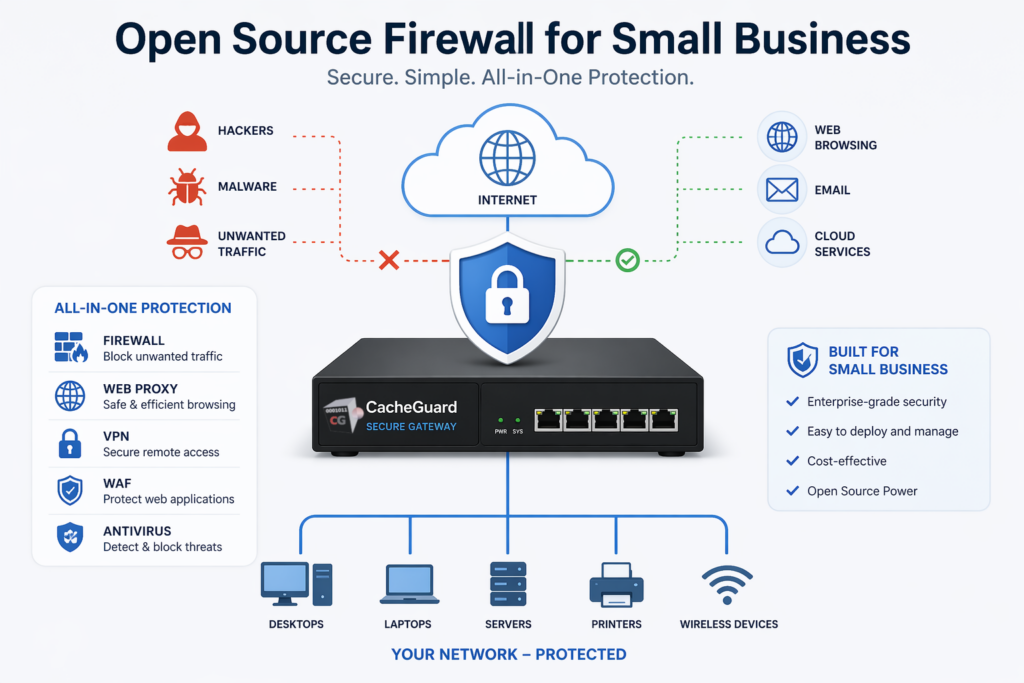
What makes CacheGuard the best open source firewall for small business is its all-in-one approach. Everything is included and works together out of the box:
- Stateful firewall with fine-grained traffic control
- IPsec VPN for secure remote access and site-to-site connectivity
- Gateway-level web antivirus powered by ClamAV
- URL filtering to block malicious and unwanted websites
- SSL inspection to detect threats in encrypted HTTPS traffic
- Web Application Firewall to protect your web applications
- Reverse proxy and application load balancer
- Multi-WAN support with automatic failover and load balancing
- QoS and traffic shaping
- Web caching to reduce bandwidth usage
- Centralized management via CacheGuard Manager for multi-site deployments
No plugins, no packages, no compatibility issues. Install the ISO on any x86 machine or VM and your small business network is protected in under an hour.
Best for: Startups, small and medium businesses, schools, MSPs and any organization that needs a complete UTM solution without a dedicated security team.
pfSense — Best Open Source Firewall for Advanced Users
pfSense is a powerful and highly configurable open source firewall built on FreeBSD. It offers advanced routing, multi-WAN support, IPsec and SSL VPN, and a large ecosystem of packages for extending functionality.
pfSense is an excellent choice for organizations with experienced network administrators who need granular control over every aspect of their firewall configuration. However it requires significant expertise and time investment to deploy correctly, and reaching a feature-complete UTM setup requires installing and maintaining multiple third-party packages.
Best for: Organizations with experienced IT teams that need deep configuration control and advanced routing capabilities.
OPNsense — Best Open Source Firewall for Community Support
OPNsense is a FreeBSD-based open source firewall with a strong focus on usability and an active community. It offers a modern web interface, regular releases and a plugin system for extending its capabilities.
Like pfSense, OPNsense requires additional plugins to reach UTM feature parity and is best suited for users with solid networking knowledge.
Best for: Organizations that want a well-supported open source firewall with a modern interface and are comfortable managing plugins and configuration.
Open Source Firewall for Small Business: Feature Comparison
| Feature | CacheGuard | pfSense | OPNsense |
|---|---|---|---|
| Firewall | ✅ | ✅ Advanced | ✅ Advanced |
| IPsec VPN | ✅ | ✅ | ✅ |
| SSL VPN | ❌ | ✅ | ✅ |
| Web antivirus | ✅ Built-in | ⚠️ Package | ⚠️ Plugin |
| URL filtering | ✅ Built-in | ⚠️ Package | ⚠️ Plugin |
| SSL inspection | ✅ Built-in | ⚠️ Package | ⚠️ Plugin |
| WAF | ✅ Built-in | ⚠️ Package | ⚠️ Plugin |
| Reverse proxy | ✅ Built-in | ⚠️ Package | ⚠️ Plugin |
| Load balancer | ✅ Built-in | ⚠️ Package | ⚠️ Plugin |
| Web caching | ✅ Built-in | ⚠️ Package | ⚠️ Plugin |
| Multi-WAN and QoS | ✅ | ✅ | ✅ |
| Centralized management | ✅ | ❌ | ❌ |
| Setup time | Under 1 hour | Several hours to days | Several hours to days |
| Base OS | Custom Linux | FreeBSD | FreeBSD |
| Cost | Free | Free | Free |
| Open source | ✅ | ✅ | ✅ |
How to Deploy an Open Source Firewall for Your Small Business
Here is a practical step by step plan for deploying an open source firewall in a small business environment:
Step 1: Define your requirements
Before choosing a solution, answer these questions. How many users does your network support? Do you have remote workers who need VPN access? Do you run any web applications that need WAF protection? Do you have multiple internet connections? Your answers will determine which features matter most.
Step 2: Choose your hardware
For most small businesses, an open source firewall runs comfortably on a modest x86 machine with at least two network interfaces — one for the internet connection and one for the internal network. A repurposed desktop, a small form factor PC or a virtual machine in your existing infrastructure all work well.
Step 3: Download and install
With CacheGuard, download the ISO from cacheguard.com, boot your machine from it and follow the installer. The process takes around 15 minutes. With pfSense or OPNsense, download the ISO from their respective websites and follow their installation guides.
Step 4: Configure your network
Connect your firewall between your internet connection and your internal network. Configure your external and internal interfaces through the web interface. This is the step that requires the most networking knowledge — CacheGuard’s documentation walks you through it clearly.
Step 5: Enable security features
Activate your security features progressively. Start with the firewall rules and VPN. Then enable web antivirus and URL filtering. Add the WAF if you run web applications. Configure QoS if bandwidth management is important. Each feature can be enabled independently.
Step 6: Test and monitor
Once deployed, test your configuration by verifying that firewall rules work as expected, VPN connections are functional and web filtering is active. Set up log monitoring so you can spot unusual activity early.
Common Mistakes When Deploying an Open Source Firewall for Small Business
Choosing complexity over usability. The most powerful firewall is worthless if your team cannot manage it. Choose a solution that matches your team’s expertise level.
Skipping the VPN. Remote workers connecting without a VPN are a significant security risk. Always deploy VPN from day one.
Ignoring updates. An unpatched firewall is worse than no firewall because it gives you false confidence. Keep your appliance updated regularly.
Using a single network interface machine. A firewall needs at least two network interfaces — one facing the internet and one facing your internal network. Always verify your hardware before starting.
Not testing after deployment. Always verify that your firewall rules are working correctly after deployment. Assume nothing — test everything.
Conclusion
An open source firewall for small business is no longer a compromise between cost and capability. Modern solutions like CacheGuard deliver comprehensive, enterprise-grade network protection — firewall, VPN, antivirus, WAF, URL filtering, SSL inspection and more — completely free, on hardware you already own, in under an hour.
The right choice depends on your team’s expertise and your specific requirements. If you need an all-in-one solution that works out of the box without specialist knowledge, CacheGuard is the answer. If you need deep configuration control and have the networking expertise to manage it, pfSense or OPNsense are worth exploring.
Whatever you choose, the most important thing is to act now. Every day your small business operates without a proper firewall is a day of unnecessary risk.
Download CacheGuard for free and have your small business network protected in under an hour.
Questions about deploying CacheGuard? Visit the community forum at help.cacheguard.net or browse the full documentation at CacheGuard Documentation.