

A DMZ network — short for Demilitarized Zone — short for Demilitarized Zone — is one of the most commonly referenced concepts in network security, and one of the least clearly explained for the SMEs (Small and Medium-sized Enterprises) it is most relevant to. Most articles either define it in academic terms and move on, or assume a level of network infrastructure that most SMEs do not have. This guide explains what a DMZ network actually is, why it exists, and — most importantly — gives you an honest answer to whether your organization needs one.
What Is a DMZ Network?
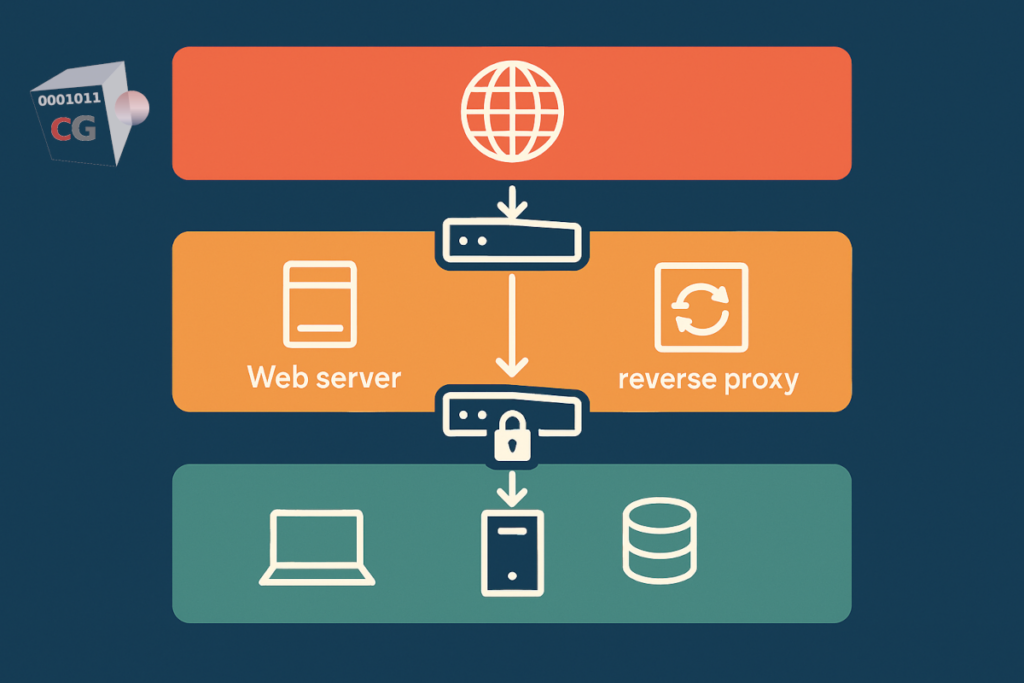
A DMZ network is an isolated network zone that sits between your internal network and the internet. It is designed specifically to host services that need to be reachable from the internet — web servers, email servers, API gateways, reverse proxies — while keeping those services physically and logically separated from the rest of your internal network.
The core security logic is containment. If an internet-facing server in the DMZ network is compromised, the attacker gains access to that server and nothing else. They cannot reach your file server, your accounting system, your internal databases, or any other internal resource — because the DMZ zone is isolated from the internal zone by firewall rules that block all traffic between them unless explicitly permitted.
Without a DMZ, a compromised internet-facing server is a direct entry point into your entire internal network. With a DMZ, it is a dead end.
How a DMZ Network Works
A DMZ network is created by placing internet-facing servers in a separate network zone, controlled by firewall rules on both sides:
- External firewall rules — control what traffic from the internet can reach the DMZ. Typically only the specific ports required by each service are permitted: TCP/443 for HTTPS, TCP/25 for SMTP, and so on. Everything else is blocked.
- Internal firewall rules — control what traffic the DMZ can send to the internal network. In most configurations, DMZ servers are permitted to reach specific internal resources they legitimately need — a web server reaching a database, for example — and nothing else. All other traffic from the DMZ to the internal network is blocked by default.
This creates three distinct zones: the internet (untrusted), the DMZ (semi-trusted, externally accessible), and the internal network (trusted, not directly reachable from the internet).
Single-firewall DMZ vs dual-firewall DMZ
The architecture can be implemented with one or two firewalls. In a single-firewall DMZ, one device with at least three network interfaces separates all three zones — internet, DMZ, and internal network — using different interface rules for each. This is the most practical architecture for SMEs: it requires one appliance, is manageable from a single interface, and provides genuine DMZ isolation.
A dual-firewall DMZ places a second firewall between the DMZ and the internal network, creating an additional enforcement layer. It is more resilient — an attacker who bypasses the first firewall still faces the second — but adds hardware, complexity, and cost. For SMEs, the single-firewall architecture provides a substantial security improvement over having no DMZ at all, without the operational overhead of two separate firewall appliances.
What the “DMZ” feature on your router is not
Many consumer routers have a setting labeled “DMZ.” It is worth being explicit: this is not a DMZ network. The router’s DMZ feature designates a single device to receive all inbound traffic that is not matched by port forwarding rules. That device remains on the same network segment as everything else — there is no separate subnet, no zone isolation, and no firewall rules controlling traffic between the “DMZ host” and the rest of the network. If that device is compromised, the attacker has direct access to your entire LAN. A true DMZ network requires a firewall appliance with dedicated network interfaces and zone-based rule enforcement.
What Goes in a DMZ Network?
The DMZ is the right place for any server or service that must be reachable from the internet but should not have unrestricted access to your internal network. Common examples:
- Web servers and web applications — customer portals, e-commerce sites, APIs, and any HTTP/HTTPS service accessed by external users
- Reverse proxies — a reverse proxy in the DMZ receives all inbound HTTPS traffic, applies SSL termination and WAF inspection, and forwards only clean requests to backend servers in the internal network
- Email servers — SMTP servers that receive inbound mail from the internet, screened before messages reach internal mailboxes
- VPN endpoints — the VPN server accepts connections from remote workers in the DMZ; authenticated users are granted access to internal resources via controlled internal firewall rules
- DNS servers — authoritative DNS servers for public-facing domains can be isolated in the DMZ to prevent their compromise from exposing internal name resolution
- IoT and operational devices — devices that require internet connectivity but should not be on the same network as company data, as covered in our guide to securing IoT devices on your network
Do You Need a DMZ Network? The Honest Answer
The answer depends on one question: do you run any internet-facing services on your own infrastructure?
If you host internet-facing services on your own servers — yes, you need a DMZ network
If your organization runs a web server, an API, a customer portal, an email server, or any other service that is directly reachable from the internet on hardware you control — you need a DMZ network. Without one, a compromised service is a direct entry point to your entire internal network. The DMZ contains the blast radius of a compromise to the affected server, protecting everything behind the internal firewall.
This applies even if the service appears low-risk. A simple company website running on an on-premises web server has the same structural exposure as a complex web application — if the server is compromised, the attacker is inside your network perimeter. A DMZ prevents that from translating into access to internal resources.
If all your services run in the cloud — probably not
If your organization uses only cloud-hosted services — your website on a managed hosting platform, email through Microsoft 365 or Google Workspace, file sharing through a cloud storage service — you are not running internet-facing services on your own infrastructure. There is nothing on your internal network that the internet needs to reach. A DMZ network protects internal networks from compromised internet-facing servers; if those servers are in the cloud provider’s infrastructure rather than yours, the DMZ concept applies to the cloud provider’s architecture, not your office network.
In this scenario, your internal network is entirely outbound — your devices initiate connections to cloud services, but no inbound connections from the internet reach your network. A perimeter firewall with a default-deny inbound policy, combined with a complete UTM security stack, provides appropriate protection without a DMZ.
If you run a reverse proxy — the DMZ is built in
A common architecture for SMEs running web applications is a reverse proxy sitting in front of backend servers. As we covered in our guide to reverse proxies and WAFs, the reverse proxy receives all inbound HTTPS connections, applies SSL termination and WAF inspection, and forwards clean requests to the backend. If the reverse proxy is in an isolated zone and backend servers are in the internal zone, this topology is effectively a DMZ — the externally accessible component is separated from the sensitive backend by a firewall.
Setting Up a DMZ Network With CacheGuard
CacheGuard’s zone-based firewall architecture makes DMZ network setup straightforward. The appliance supports multiple network zones, each implemented as a dedicated network interface or VLAN with its own independent firewall policy.
CacheGuard defines three main zone types. The external zone connects to the internet and is untrusted by default — all unsolicited inbound connections are blocked. The internal zone (called the web zone in CacheGuard) connects to your LAN. It also supports functional VLANs within that zone — in particular, the rweb VLAN, which is specifically designed to host web servers and acts as a built-in DMZ for web-facing services: servers placed in rweb are reachable from the internet on defined ports, while remaining isolated from the rest of the internal LAN.
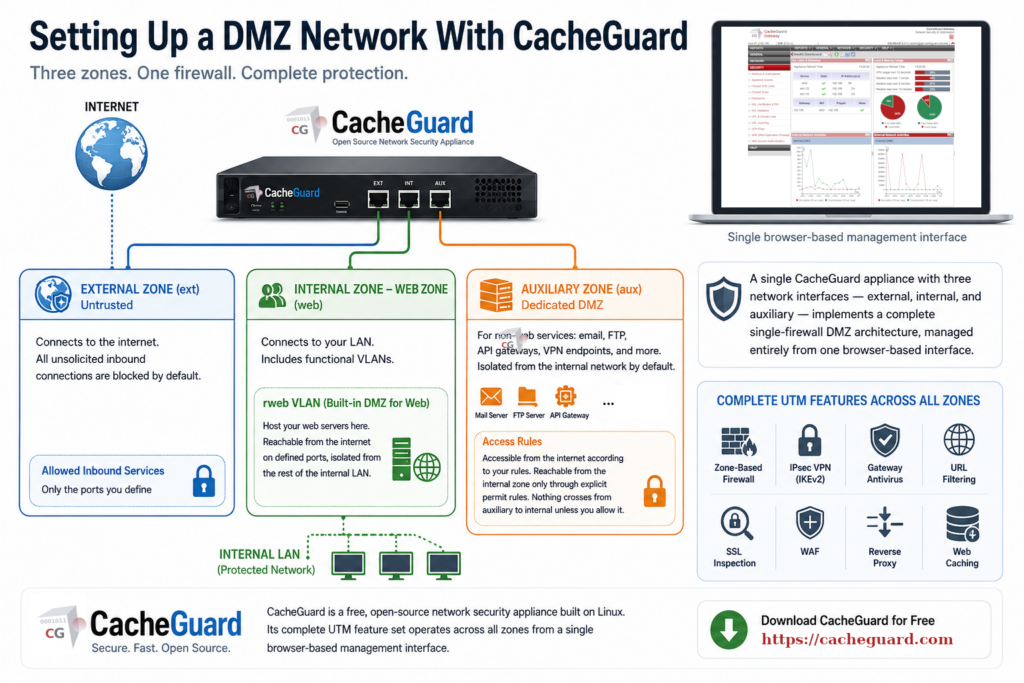
For more general DMZ use cases — hosting email servers, file transfer servers, API gateways, or any other internet-facing service that is not a web server — CacheGuard provides a dedicated auxiliary zone. This zone is isolated from the internal network by default. It is accessible from the internet according to the firewall rules you define, and reachable from the internal zone only through explicit permit rules. Nothing crosses from the auxiliary zone to the internal network unless you specifically allow it.
A single CacheGuard appliance with three network interfaces — external, internal, and auxiliary — therefore implements a complete single-firewall DMZ architecture, managed entirely from one browser-based interface.
CacheGuard is a free, open-source network security appliance built on Linux. Its complete UTM feature set — zone-based firewall, IPsec VPN with IKEv2 based on StrongSwan, gateway antivirus, URL filtering, SSL inspection, WAF, reverse proxy, and web caching — operates across all zones from a single browser-based management interface. You can download CacheGuard for free from the official website.
CacheGuard is a free, open-source network security appliance built on Linux. Its complete UTM feature set — zone-based firewall, IPsec VPN with IKEv2 based on StrongSwan, gateway antivirus, URL filtering, SSL inspection, WAF, reverse proxy, and web caching — operates across all zones from a single browser-based management interface. You can download CacheGuard for free from the official website.
DMZ Network: The Decision in Plain Terms
A DMZ network is not a complexity reserved for large enterprises. It is a straightforward architectural pattern — put internet-facing services in one zone, internal resources in another, block traffic between them — that any SME running its own servers should implement. The technical barrier to doing so with a modern network security appliance is low. The security improvement is significant.
If you run no internet-facing services on your own infrastructure, you do not need a DMZ today — but the answer may change as your organization grows. Understanding what a DMZ network is and when it becomes necessary is the right preparation for that moment.
Want to go deeper? Read our guide to Web Application Firewalls for how WAF inspection fits into a DMZ architecture, or our guide to securing IoT devices on your network for how zone isolation applies to connected devices. Ready to get started? Download CacheGuard for free and have it running today.
Questions about deploying CacheGuard? Visit the community forum at help.cacheguard.net or browse the full documentation at CacheGuard Documentation.
