
Network Gateway for Small Business: Easy Setup Guide
Setting up a network gateway for small business is easier than most people think. You don’t need an IT team or a networking degree — just two simple concepts: IP addresses and default routes. Once you understand those, you’re ready to deploy CacheGuard and take full control of your office internet connection.
What is an IP address?
Think of an IP address like a postal address for a device.
Every device on your network — laptop, phone, printer, router — has an IP address: a string of numbers like 192.168.1.42. When your laptop wants to reach a website, it uses that address to identify itself, and the network uses it to deliver the response back to the right device.
Two types matter here:
- Private IP addresses — used inside your office network (e.g.
192.168.1.x). Devices can talk to each other, but the internet can’t reach them directly. - Public IP address — the single address your ISP assigns your router. It’s how the outside world sees your network.
What is a default route?
Imagine you’re in an unfamiliar city and need to mail a letter. You don’t know where every post office is, so you ask: “Where do I go when I don’t know where to go?” Someone points you to the main sorting office. That’s your default.
In networking, a default route works the same way. When a device doesn’t know how to reach an address on the internet, it follows its default route — which points to a gateway. The gateway forwards the traffic onward.
In a typical office setup the chain looks like this:
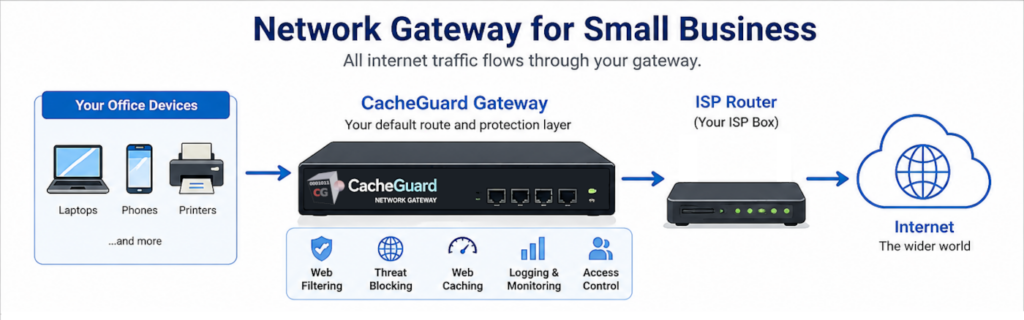
- Your devices → your router (the ISP box)
- Your router → your ISP
- Your ISP → the wider internet
Every device has a default route. It’s simply the answer to: “If I don’t know where to go, who do I ask?”
Why every network gateway for small business matters
Whoever sits at the gateway controls what traffic passes through. Your ISP box is your default gateway — but it’s designed to be open and simple. It doesn’t inspect traffic, block threats, or log activity. It just forwards everything.
A dedicated network gateway for small business like CacheGuard inserts itself between your devices and the ISP router and becomes the new default route. Every packet flows through it, giving you the power to:
- Block malicious websites and malware
- Filter content by category
- Cache web content to speed up browsing
- Log and monitor network activity
- Control who can access what
How to set up your network gateway for small business with CacheGuard
CacheGuard is a free, open-source network gateway that runs on a standard PC or virtual machine. Here’s how to deploy it.
Step 1: network gateway physical setup
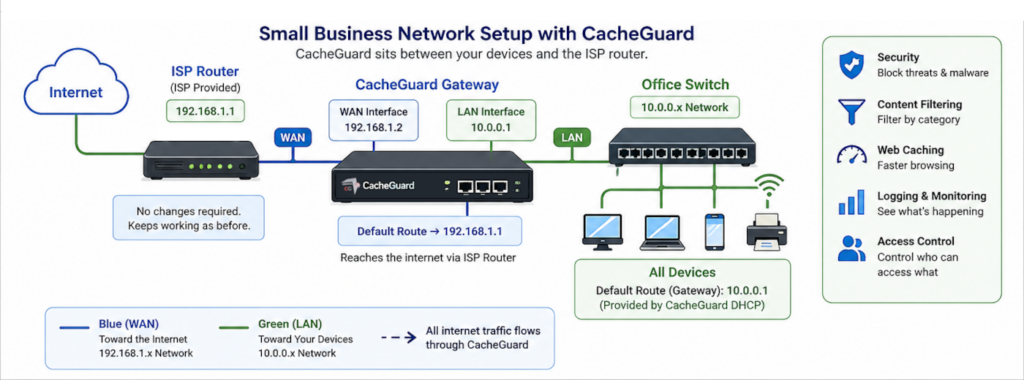
Place CacheGuard between your devices and your ISP router. It needs two network interfaces:
- WAN interface — connected to your ISP router (toward the internet)
- LAN interface — connected to your internal switch (toward your devices)
[Internet]
    |
[ISP Router]        ← e.g. 192.168.1.1
    |
[CacheGuard]        ← WAN: 192.168.1.2 / LAN: 10.0.0.1
    |
[Office switch]
    |
[All your devices]  ← default route: 10.0.0.1
Step 2: configure the IP addresses
CacheGuard’s WAN interface
Assign it an IP on the same subnet as your ISP router — e.g. 192.168.1.2 if the router is 192.168.1.1. Set CacheGuard’s default route to point to the ISP router. This is how it reaches the internet.
CacheGuard’s LAN interface
Assign it an IP on a separate private network — e.g. 10.0.0.1. This becomes the gateway address for all your office devices.
Your devices
Set each device’s default route to 10.0.0.1. The easiest way is to let CacheGuard act as your DHCP server — it hands out IP addresses and automatically tells devices “your gateway is me.”
💡 Tip: Your ISP router needs no changes at all. CacheGuard simply inserts itself in the chain and the router keeps working exactly as before.
For a deeper look at network architecture — such as isolating servers from the rest of your network — see: What is a DMZ network?
CacheGuard is free to download and run. Put the right network gateway for small business in the chain, point your devices at it, and let it do the work.Visit the CacheGuard website →
Questions about deploying CacheGuard? Visit the community forum at help.cacheguard.net or browse the full documentation at CacheGuard Documentation.