

If you are looking for a Fortinet alternative, cost and hardware lock-in are probably the first reasons. Fortinet FortiGate is a genuinely capable next-generation firewall and UTM platform — but it comes with proprietary hardware requirements, annual subscription licensing for its security features, and a price tag that puts it firmly in the enterprise category.
This article explains what FortiGate offers, where it falls short for budget-conscious organizations, and why CacheGuard is worth considering as a Fortinet alternative that delivers comprehensive UTM security without the cost, complexity or vendor lock-in.
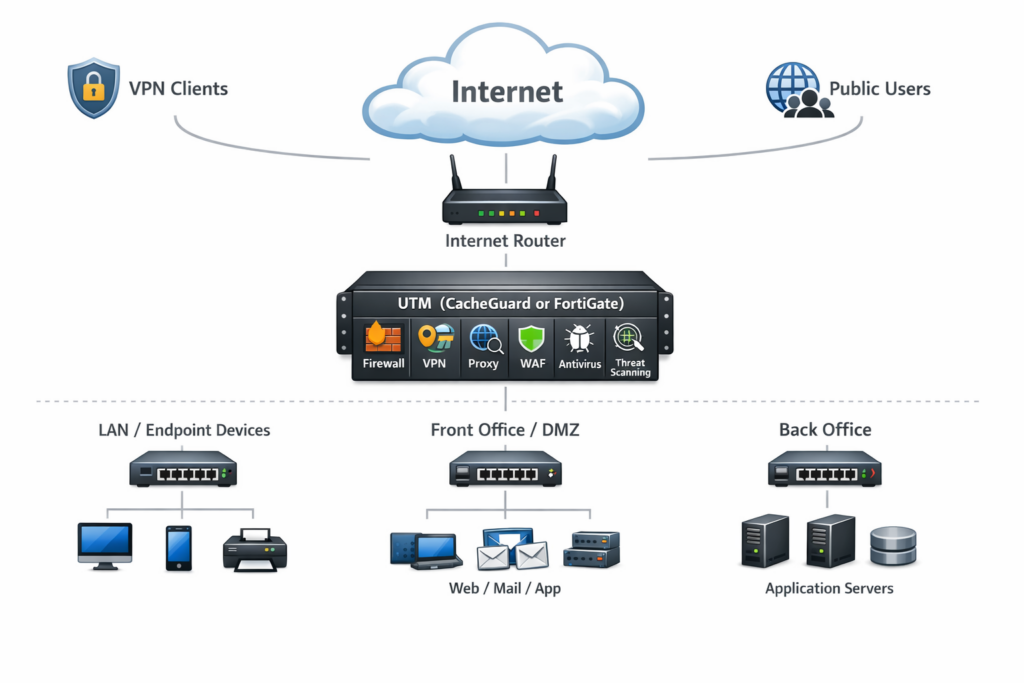
What Is Fortinet FortiGate?
Fortinet FortiGate is a commercial next-generation firewall and UTM appliance produced by Fortinet, one of the world’s leading cybersecurity vendors. It runs FortiOS — Fortinet’s proprietary operating system — and is available as dedicated hardware appliances, virtual machines and cloud instances.
FortiGate combines firewall, intrusion prevention, antivirus, web filtering, application control, VPN, sandboxing, data loss prevention and email security into a single platform. It integrates with the broader Fortinet Security Fabric ecosystem — including FortiManager for centralized management, FortiAnalyzer for logging and analytics, and FortiGuard for threat intelligence feeds.
FortiGate is trusted by large enterprises worldwide and is particularly strong in environments that require high throughput, fine-grained policy control and compliance-ready security frameworks.
Why Organizations Look for a Fortinet Alternative
High cost and subscription dependency. FortiGate appliances require annual subscription licenses to access security features including antivirus, web filtering, IPS and sandboxing. Without active subscriptions, the appliance operates with significantly reduced functionality. The total cost of ownership — hardware, licensing, renewals and support — places FortiGate firmly out of reach for most startups and small businesses.
Proprietary hardware lock-in. FortiGate is designed around Fortinet’s proprietary ASIC hardware. While virtual and cloud versions exist, the licensing model still ties you to Fortinet’s ecosystem. You cannot run the full FortiGate feature set on commodity servers you already own at no additional cost.
Complexity for non-specialist teams. FortiGate’s depth of configuration is a genuine strength for enterprise security teams — but it becomes a burden for organizations without dedicated network security engineers. The learning curve is steep and the configuration surface is large.
Vendor ecosystem dependency. Getting the most out of FortiGate typically requires deploying additional Fortinet products — FortiManager, FortiAnalyzer, FortiGuard. Each adds cost and complexity.
CacheGuard as a Fortinet Alternative
CacheGuard delivers a complete, integrated UTM security stack in a single ISO — free to deploy on any hardware, actively maintained since 2002, with no subscription fees and no vendor lock-in.
A completely free Fortinet alternative
CacheGuard-OS is completely free regardless of the number of users, devices or appliances you deploy. There are no licensing tiers, no annual renewals and no features gated behind a subscription paywall. Optional paid support plans and subscription services are available for organizations that need them — but the core software is always free.
For an organization that would otherwise be paying thousands of euros per year for FortiGate licensing and support, the savings are immediate and permanent.
Run it on any hardware
Unlike FortiGate, which is optimized for Fortinet’s proprietary hardware, CacheGuard runs on any standard x86/x64 bare-metal machine or virtual machine — including hardware you already own. VMware, VirtualBox, Proxmox, KVM, Hyper-V, AWS, Azure — CacheGuard works on all of them at no additional cost.
Born in 2002, built from scratch
CacheGuard-OS is not a fork of another project or an application running on top of a general-purpose Linux distribution. It is a fully custom, network appliance oriented operating system built entirely from scratch since 2002 as a derivation of LFS (Linux From Scratch) — representing over 5,000 man days of research and development. The full source code is available on GitHub.
Everything included out of the box
CacheGuard includes a complete UTM stack built in and working together from day one:
- Stateful firewall with fine-grained traffic control rules
- IPsec VPN for secure remote access and site-to-site connectivity
- Gateway-level web antivirus powered by ClamAV
- Filtering web proxy with URL filtering capabilities — with LDAP/AD integration
- SSL inspection — called SSL mediation in CacheGuard — for encrypted traffic scanning and HTTPS caching
- Web Application Firewall powered by ModSecurity and OWASP Core Rule Set
- Reverse proxy and application load balancer with high availability mode
- Multi-WAN support with automatic failover
- QoS and bandwidth management powered by HTB and SFQ
- Web caching to reduce bandwidth usage
- Integrated mini PKI for internal certificate management
- Centralized management via CacheGuard Manager for multi-site deployments
No plugins, no subscription modules, no proprietary hardware required.
Fortinet FortiGate vs CacheGuard: Feature Comparison
| Feature | FortiGate | CacheGuard |
|---|---|---|
| Firewall | ✅ Advanced | ✅ Standard, suitable for most deployments |
| IPsec VPN | ✅ | ✅ |
| SSL VPN | ✅ | ❌ IPsec only |
| Web antivirus | ✅ Subscription required | ✅ Built-in, free |
| URL filtering | ✅ Subscription required | ✅ Built-in, LDAP/AD, free |
| SSL inspection | ✅ | ✅ Built-in, free |
| WAF | ⚠️ Optional add-on | ✅ Built-in, free |
| Reverse proxy | ❌ | ✅ Built-in, free |
| Load balancer | ⚠️ Limited | ✅ Built-in, free |
| Web caching | ❌ | ✅ Built-in, free |
| Multi-WAN and QoS | ✅ | ✅ Built-in, free |
| Intrusion prevention (IPS) | ✅ Subscription required | ❌ |
| Sandboxing | ✅ Subscription required | ❌ |
| Email security | ✅ Subscription required | ❌ |
| Integrated mini PKI | ❌ | ✅ |
| Centralized management | ✅ FortiManager (paid) | ✅ CacheGuard Manager, free |
| Hardware flexibility | ❌ Proprietary optimized | ✅ Any x86 hardware or VM |
| Open source | ❌ | ✅ Full codebase |
| Built from scratch since | 2000 (FortiOS) | 2002 (LFS from scratch) |
| Cost | Proprietary hardware + annual subscriptions | Free |
Who Should Choose CacheGuard as Their Fortinet Alternative
CacheGuard is the right Fortinet alternative for:
Startups and small businesses that need comprehensive UTM security without enterprise pricing. CacheGuard delivers firewall, VPN, antivirus, WAF, URL filtering, SSL inspection, reverse proxy, load balancer and QoS — all free, on hardware you already own.
Growing organizations with multiple sites that need centralized management across several locations without paying for FortiManager. CacheGuard Manager provides centralized control of multiple gateways at no additional cost.
Organizations that value open source transparency. CacheGuard’s full source code is publicly available on GitHub — something FortiGate, as a closed proprietary platform, fundamentally cannot offer.
Organizations running web-facing applications that need WAF and reverse proxy protection — features that FortiGate only offers as optional add-ons.
MSPs and IT consultants who need a repeatable, cost-effective security solution for multiple clients without per-device licensing costs eating into their margins.
Who Should Stick With Fortinet FortiGate
CacheGuard is not the right choice for every organization. FortiGate remains the better option for:
- Large enterprises with complex, high-throughput network environments that require Fortinet’s dedicated ASIC hardware performance
- Organizations that specifically need SSL VPN in addition to IPsec VPN
- Deployments requiring advanced intrusion prevention, sandboxing or data loss prevention
- Organizations already deep in the Fortinet Security Fabric ecosystem
- Environments subject to strict compliance frameworks requiring certified vendor solutions and vendor-backed SLAs
Fortinet Alternative Decision Guide
| Organization size | Network complexity | Recommended solution | Reason |
|---|---|---|---|
| 1 to 50 users | Simple, single site | CacheGuard | Easy, complete, zero cost |
| 50 to 200 users | Moderate, 1 to 3 sites | CacheGuard | Multi-site management, cost-effective |
| 200 to 500 users | Moderate, multiple sites | CacheGuard | Centralized, easy to maintain |
| 500 to 1,000 users | Complex, distributed | FortiGate | Advanced policies, threat intelligence |
| Over 1,000 users | High, multi-data center | FortiGate | High performance, FortiGuard integration |
| Any size, regulated | Mission-critical | FortiGate | Advanced configurability, vendor support |
How to Get Started With CacheGuard
Getting started with CacheGuard as your Fortinet alternative is straightforward:
- Download CacheGuard for free from cacheguard.com
- Install on any x86/x64 bare-metal machine or VM with at least two network interfaces
- Access the web interface and configure your network settings
- Enable security features progressively — firewall, VPN, antivirus, WAF, URL filtering
- Your network is protected in under an hour — at zero ongoing cost
The full source code is available on GitHub and the documentation covers every step in detail.
Conclusion
If you are looking for a Fortinet alternative that delivers comprehensive UTM security without proprietary hardware, mandatory subscription fees and vendor lock-in, CacheGuard is a compelling choice.
It does not replicate every advanced feature that FortiGate offers — SSL VPN, advanced IPS, sandboxing and deep FortiGuard threat intelligence remain FortiGate strengths. But for the vast majority of startups, small businesses and growing organizations, CacheGuard covers every security need that matters — completely free, on any hardware, forever.
Download CacheGuard for free and see how much you can save without compromising on security.
Questions about deploying CacheGuard? Visit the community forum at help.cacheguard.net or browse the full documentation at CacheGuard Documentation.
