

URL filtering is one of the most effective preventive security controls available for any network. By blocking access to malicious, inappropriate or unwanted websites before users can interact with them, it stopcos threats at the source rather than trying to clean up after infection.
This guide explains what URL filtering is, how it works for both HTTP and HTTPS traffic, how it differs from other web security techniques, and how to implement it for free with CacheGuard.
What Is URL Filtering?
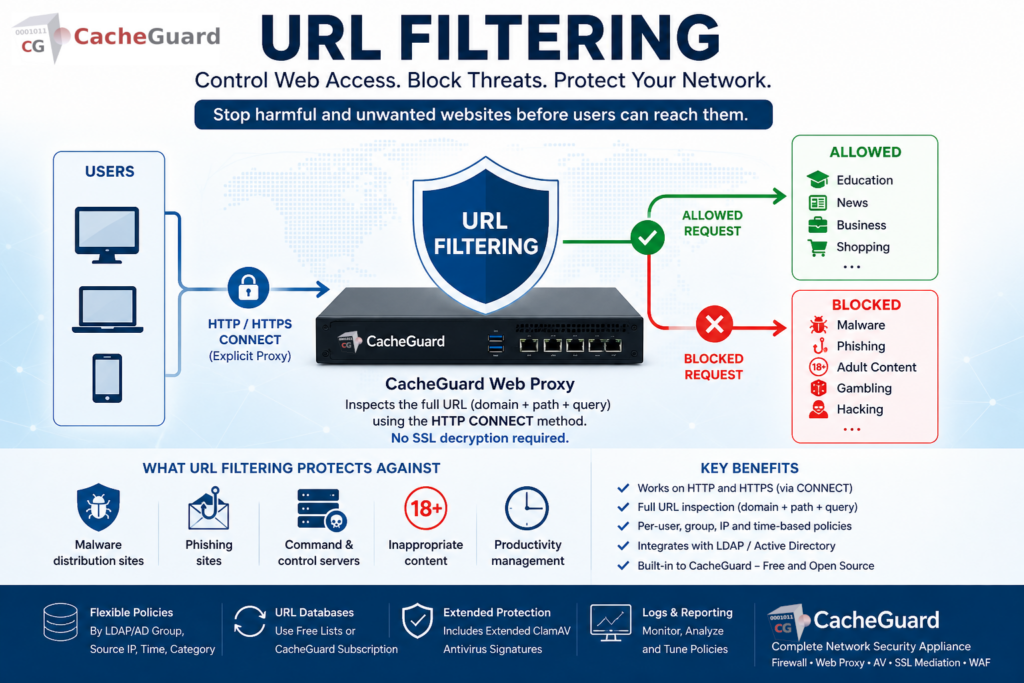
URL filtering is a network security technique that controls which websites and web resources users on your network can access. It works by inspecting the URLs of web requests and comparing them against a database of categorized websites — blocking requests that match blocked categories or specific domains, and allowing requests that match permitted ones.
A URL filtering system typically classifies websites into categories — malware, phishing, adult content, gambling, social media, hacking, dating, and many others. Network administrators define policies that allow or block access to specific categories, either for all users or for specific groups of users.
What URL Filtering Protects Against
URL filtering is primarily a preventive control — it stops users from reaching harmful or inappropriate destinations before any damage can occur:
Malware distribution sites. Many malware infections begin with a visit to a compromised or malicious website. This feature blocks access to known malware distribution sites before any malicious content is downloaded.
Phishing sites. Phishing attacks rely on users visiting fake websites that impersonate legitimate ones. It blocks access to known phishing domains — stopping credential theft before it happens.
Command and control servers. Malware already installed on a device needs to communicate with its command and control server to receive instructions or exfiltrate data. Blocking these destinations at the network level limits the damage of an infection that has already occurred.
Inappropriate content. Organizations can block access to categories of content that are inappropriate in a professional environment — adult content, gambling, social media during work hours — enforcing acceptable use policies at the network level.
Productivity management. Beyond security, web filtering allows organizations to limit access to time-wasting websites during work hours, improving productivity without requiring device-level controls.
URL Filtering vs DNS Filtering: What Is the Difference?
URL filtering and DNS filtering are often confused because they achieve similar results — blocking access to unwanted websites. However they work at different levels and have different strengths.
DNS filtering works at the DNS resolution level. When a user’s device tries to resolve a domain name, the DNS filter intercepts the query and blocks it if the domain is in a blocklist. DNS filtering is fast, lightweight and effective — but it operates at the domain level. It cannot distinguish between different pages or paths on the same domain. For example it can block malicious-site.com entirely but cannot block youtube.com/gaming while allowing youtube.com/education. It also has a significant weakness: it can be bypassed by modifying the /etc/hosts file on the user’s device — which maps domain names to IP addresses locally, completely bypassing DNS resolution and any DNS-level filtering.
URL filtering works at the HTTP request level. It is typically based on the usage of a web proxy — a server that intercepts web requests on behalf of users and applies filtering rules before forwarding them to the internet. It inspects the full URL of each request — including the path, query parameters and subdirectory — giving much finer-grained control. It can block specific pages or sections of a website while allowing others, and can apply different policies to different user groups. Because it operates at the proxy level rather than the DNS level, it cannot be bypassed by modifying the /etc/hosts file.
| DNS Filtering | URL Filtering | |
|---|---|---|
| Works at | DNS resolution level | HTTP request level via web proxy |
| Granularity | Domain level only | Full URL including path |
| Block specific pages | ❌ | ✅ |
| Per-group policies | ❌ | ✅ |
| HTTPS support | ✅ | ✅ (via CONNECT method in explicit mode) |
| Can be bypassed via /etc/hosts | ❌ Yes — easily bypassed | ✅ No — proxy level cannot be bypassed this way |
| Performance overhead | Very low | Low to moderate |
How URL Filtering Works for HTTPS Traffic
This is one of the most common questions about URL filtering — and an important technical distinction that is often misunderstood.
Most web traffic today uses HTTPS. A common assumption is that web filtering cannot work on HTTPS traffic without SSL inspection — because the traffic is encrypted. This is true for some implementations, but not all.
URL Filtering Without SSL Inspection — The HTTP CONNECT Method
URL filtering is typically implemented through a web proxy. When CacheGuard (Web Gateway) is configured as an explicit web proxy, browsers and applications route their HTTPS requests through the proxy using the HTTP CONNECT method.
With the CONNECT method, the client sends the full URL it wants to connect to in plain text — before the encrypted tunnel is established. Contrary to a common misconception, the proxy does not only see the hostname — it sees the complete URL, including the path and query parameters. This gives the URL filtering engine the ability to inspect and block requests at the full URL level, not just at the domain level — all without decrypting any HTTPS traffic.
It is important to note that the HTTP CONNECT method only works in explicit proxy mode — where user devices are configured to use CacheGuard as their web proxy. In transparent proxy mode, the proxy intercepts HTTP traffic automatically without any client configuration, but the CONNECT method is not available. In transparent mode, HTTPS URL filtering at the URL level is not possible without SSL inspection.
CacheGuard is a free, open-source network security appliance that includes a fully integrated URL filtering engine — called URL Guarding in CacheGuard — as a built-in feature with no additional software, plugins or licensing required.
CacheGuard’s URL filtering and SSL inspection features are completely independent:
- URL filtering (URL Guarding) uses the HTTP CONNECT method in explicit proxy mode to intercept and filter HTTPS destinations at the full URL level — no SSL decryption required
- SSL inspection — called SSL mediation in CacheGuard — decrypts HTTPS traffic to scan it for malware with the web antivirus
These are two separate security functions serving different purposes. URL filtering controls where users can go. SSL inspection controls what content is allowed through. Both can be used independently or together.
URL Filtering Policies: Flexible Control with URL Guarding
One of the most powerful aspects of URL Guarding in CacheGuard is the flexibility of its filtering policies. Rather than applying a single blanket policy to all users, administrators can define filtering rules based on multiple criteria:
- LDAP and Active Directory groups — apply different filtering policies to different groups of users. In this case users connecting to the web proxy must first be authenticated by an LDAP or Active Directory server before their group membership can be determined and the appropriate policy applied.
- Source IP address — apply different filtering policies based on the IP address of the requesting device, without requiring user authentication
- Access time — block certain categories during work hours but allow them outside office hours, or apply stricter policies during specific time windows
- Category-based rules — for example blocking social media for general staff while allowing it for the marketing team, or blocking hacking and dating sites for all users
This flexibility makes CacheGuard’s URL Guarding suitable for environments with diverse user populations — schools, enterprises, healthcare organizations — where a one-size-fits-all policy is not appropriate.
URL Filtering Databases: Free Lists and CacheGuard’s Subscription Service
URL filtering is only as good as the database of categorized URLs it relies on. CacheGuard supports two approaches:
Free URL Category Lists
Administrators can import URL databases from freely available categorized URL lists. Several high-quality open-source URL category lists are maintained by universities and research organizations — covering millions of URLs across many categories. CacheGuard can be configured to use these lists, giving organizations a cost-effective baseline URL filtering capability at zero ongoing cost.
CacheGuard URL Database Subscription
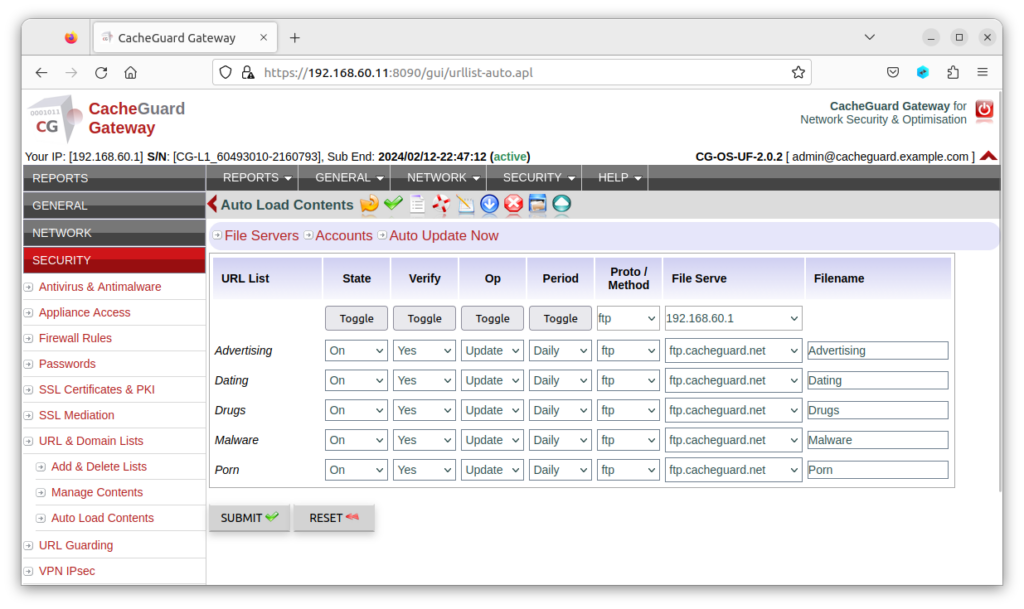
For organizations that want a professionally maintained, regularly updated URL database without the overhead of managing free lists, CacheGuard offers its own URL database subscription service at €4.99 per month. Organizations that prefer annual billing benefit from a 10% discount, bringing the cost to €49.99 per year — less than €4.17 per month. This service provides:
- A continuously updated database of categorized URLs
- Regular updates to catch new malicious and phishing sites quickly
- A broad range of content categories for policy configuration
- Simple integration with CacheGuard’s filtering configuration
- Extended antivirus signatures for ClamAV — additional virus and malware signatures beyond the standard ClamAV database, used in CacheGuard’s web content filtering to improve detection of threats in web traffic
At under €5 per month, the CacheGuard URL database subscription is one of the most cost-effective ways to maintain high-quality URL filtering and enhanced web antivirus protection without the management overhead of free lists.
URL Filtering in CacheGuard
CacheGuard includes a fully integrated URL filtering engine — called URL Guarding — as a built-in feature of its free, open-source network security appliance, powered by Squid, one of the most widely deployed and trusted open-source web proxy solutions in the world.
CacheGuard’s URL Guarding capabilities include:
- HTTP and HTTPS filtering — via the HTTP CONNECT method when used as an explicit web proxy, no SSL decryption required for HTTPS filtering
- Full URL inspection — the proxy sees the complete URL including path and query parameters, enabling precise filtering beyond just domain-level blocking
- Category-based filtering — block or allow access by website category
- Source IP address-based policies — apply different rules based on the requesting device’s IP address
- Access time-based policies — apply different rules based on the time of day or day of the week
- LDAP and Active Directory integration — apply group-based filtering policies, requiring user authentication against an LDAP or AD server
- Free URL list support — import categorized URL databases from open-source lists at no cost
- CacheGuard URL database subscription — professionally maintained, regularly updated URL database plus extended ClamAV antivirus signatures at €4.99/month or €49.99/year (10% discount)
- Whitelist and blacklist management — add specific domains to allow or block lists independently of category rules
- Transparent or explicit proxy mode — in transparent mode HTTP traffic is intercepted automatically; in explicit mode full HTTPS URL filtering via CONNECT is available
Because URL Guarding is integrated into CacheGuard’s complete UTM appliance, it works alongside the firewall, web antivirus, SSL inspection and WAF — giving you layered protection in a single, coordinated system with no additional software or licensing required.
Full configuration instructions are available in the CacheGuard User’s Guide. Note that while the User’s Guide describes basic configuration using the CLI, all settings can equally be configured through the Web GUI.
Legal Compliance and Web Access Control
Beyond security and productivity, URL filtering has an important legal dimension that organizations often overlook.
In many jurisdictions, legislation prohibits access to certain categories of websites — including content that glorifies or promotes violence, terrorism, child exploitation, or other illegal activities. When employees access such content from a company network, the organization itself may be exposed to legal liability. In some countries, the business owner and company directors can be held personally liable for such accesses if they have failed to implement reasonable technical measures to prevent them.
URL filtering is one of the primary technical controls that demonstrates an organization’s commitment to preventing access to illegal content. Implementing a properly configured URL filtering policy — blocking illegal content categories, logging access attempts and enforcing the policy consistently — provides evidence that the organization has taken its legal obligations seriously.
This legal dimension makes URL filtering not just a security tool but a compliance requirement for any organization operating in jurisdictions with such legislation. Consulting a legal advisor familiar with the specific regulations applicable to your country and industry is strongly recommended.
Best Practices for Web Access Policies
Start with a broad blocklist and refine. Begin by blocking clearly harmful categories — malware, phishing, adult content — and add more restrictive policies gradually based on your organization’s needs. Overly aggressive filtering from day one often generates complaints and exceptions that undermine the policy.
Define exceptions before rolling out. Identify legitimate business needs that might be blocked by your category policies — for example a healthcare organization that needs access to medical information sites that might be categorized as adult content — and create exceptions before users encounter problems.
Use LDAP/AD groups for granular control. A single blanket policy rarely serves all users equally. Investing time in group-based policies from the start saves significant management overhead later.
Keep your URL database updated. New malicious and phishing sites appear constantly. Whether you use free lists or a subscription service, ensure your URL database is updated regularly — ideally daily.
Monitor your filtering logs. Regularly review which requests are being blocked and which exceptions are being requested. This helps you tune your policies and identify potential security incidents — repeated attempts to reach blocked malware sites on the same device may indicate an existing infection.
Conclusion
URL filtering is one of the most practical and cost-effective security controls available to any organization. It stops threats before they reach your users, enforces acceptable use policies, and — with LDAP/AD integration — adapts to the different needs of different user groups across your organization.
With CacheGuard, URL filtering is built in and free — working seamlessly alongside your firewall, web antivirus and WAF in a single appliance. And with HTTPS filtering via the HTTP CONNECT method, it works on encrypted traffic without requiring SSL decryption.
Download CacheGuard for free and have your URL filtering up and running in under an hour.
Questions about deploying CacheGuard? Visit the community forum at help.cacheguard.net or browse the full documentation at CacheGuard Documentation.
