
What Is SSL Inspection and Why Does Your Network Need It?
SSL inspection is one of the most important and most misunderstood features of modern network security. As more and more internet traffic moves to encrypted HTTPS connections, the ability to inspect that traffic at the gateway level has become essential for any organization that takes security seriously.
This guide explains what SSL inspection is, how it works, its benefits beyond security, its limitations, and how to implement it without complexity or cost.
What Is SSL Inspection?
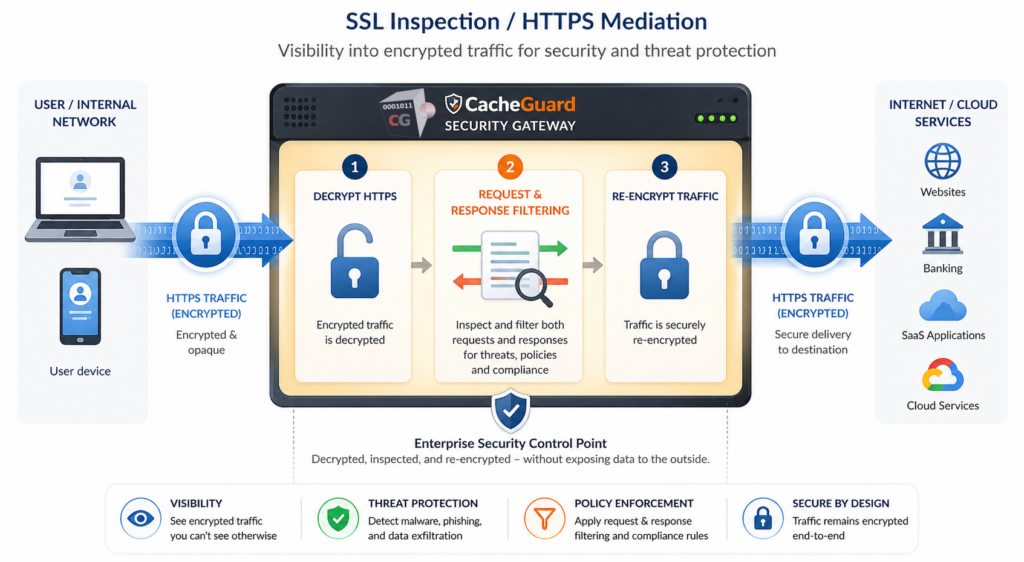
SSL inspection — also known as SSL/TLS interception — is a network security technique that allows a security appliance to decrypt, inspect and re-encrypt encrypted web traffic in real time.
When a user on your network visits an HTTPS website, all traffic between their browser and the web server is encrypted using SSL or TLS. This encryption is essential for protecting sensitive data like passwords and payment information. But it also creates a blind spot for your security tools — malware and phishing payloads can all hide inside encrypted traffic, completely invisible to a traditional firewall or antivirus scanner.
This technique solves this problem by acting as a trusted intermediary. Your security appliance decrypts the traffic, scans it for threats, and then re-encrypts it before passing it on to the user. From the user’s perspective the connection still appears secure. From the security appliance’s perspective, nothing is hidden.
Why It Matters More Than Ever
A few years ago, only a fraction of web traffic was encrypted. Today the situation has reversed — the vast majority of internet traffic uses HTTPS. This shift has created a critical problem for organizations that rely on traditional security tools.
Malware hides in encrypted traffic. Cybercriminals have adapted to the encrypted web. Modern malware increasingly uses HTTPS to communicate with command and control servers, download additional payloads, and exfiltrate stolen data — all inside traffic that looks legitimate to a security scanner that cannot see inside it.
Phishing sites use HTTPS too. The padlock icon in a browser no longer means a website is safe — it only means the connection is encrypted. Phishing sites routinely use HTTPS to appear legitimate. Without SSL inspection, your web antivirus cannot see the content of these sites.
Data exfiltration goes undetected. Insider threats and compromised devices can use encrypted HTTPS connections to send sensitive data outside your network. Without SSL inspection, this traffic is invisible to your security appliance.
Compliance requirements demand it. Many security frameworks and regulatory standards require organizations to be able to inspect all network traffic, including encrypted traffic. This technique is increasingly a compliance requirement, not just a security best practice.
How SSL Inspection Works
Understanding SSL inspection requires understanding how it fits into the flow of encrypted traffic on your network.
Without SSL Inspection
User browser → [encrypted HTTPS traffic] → Internet
Security appliance: can only see source, destination and port — content is invisible
With SSL Inspection Enabled
User browser → [encrypted] → Security appliance → [decrypted, scanned, re-encrypted] → Internet
Security appliance: can see full content and apply antivirus and other security policies
The security appliance acts as a trusted man-in-the-middle. To do this it uses its own SSL certificate — called a CA certificate — which must be installed on the devices of your users so their browsers trust the inspected connections.
The process works as follows:
- A user on your network requests an HTTPS website
- The security appliance intercepts the connection and establishes its own encrypted session with the web server
- The appliance decrypts the traffic from the web server
- It scans the content — applying antivirus and other security policies
- It re-encrypts the traffic using its own CA certificate and forwards it to the user’s browser
- The user sees a secure padlock — the connection is still encrypted end to end from their perspective
Beyond Security: Bandwidth Savings Through Caching
One of the most underappreciated benefits of SSL inspection is that it enables your security appliance to cache HTTPS content — something that is impossible without decrypting the traffic first.
Web caching stores frequently accessed content locally on your appliance, serving it directly to users without fetching it again from the internet. Without SSL inspection, caching only works for unencrypted HTTP traffic — which today represents a small and shrinking fraction of web content. With SSL inspection enabled, your appliance can cache HTTPS content too, delivering significant bandwidth savings and faster browsing for your users.
This is why CacheGuard refers to this feature as SSL mediation rather than SSL inspection — because its usefulness goes beyond security. It mediates HTTPS traffic for both protection and performance, enabling web caching that would otherwise be impossible on an encrypted connection.
For organizations with limited WAN bandwidth — or those paying for metered internet connections — this caching benefit alone can justify deploying SSL inspection independently of its security advantages.
What SSL Inspection Can Detect
Once encrypted traffic is decrypted and inspected, your security appliance can apply its web antivirus to it:
- Web antivirus — scan downloaded files and web content for malware hidden inside HTTPS traffic
- Data loss prevention — detect and block sensitive data being uploaded or exfiltrated via HTTPS
- Application control — identify and control cloud applications and services using HTTPS
It is important to note that SSL inspection and WAF serve different but complementary purposes. A WAF acts as an SSL terminator for your web applications — it naturally inspects web content as part of its role sitting in front of your servers. SSL inspection on the other hand operates on outbound traffic from your users to the internet. The two should not be confused or conflated.
Drawbacks and Limitations of SSL Inspection
SSL inspection is a powerful technique but it comes with real limitations that administrators need to manage carefully.
SSL pinning breaks certain applications. Many mobile applications and some desktop software use a technique called SSL pinning — they only accept connections authenticated by a specific certificate, not by any trusted CA. When your appliance intercepts the connection and presents its own CA certificate, these applications refuse to connect. Common examples include many banking apps, some corporate VPN clients, and various smartphone applications. Administrators must manage exceptions for these applications to allow them to bypass SSL inspection.
Exception management is ongoing work. As new applications are deployed and existing ones are updated, the list of exceptions needs to be maintained. An application that worked fine last month may start using SSL pinning after an update, requiring a new exception to be added.
Performance overhead. Decrypting, inspecting and re-encrypting traffic consumes CPU resources on your appliance. For high traffic networks, this overhead needs to be accounted for when sizing your hardware.
Privacy and legal considerations. Inspecting encrypted traffic raises privacy questions that need to be addressed through clear acceptable use policies. In some jurisdictions there may also be legal constraints on what traffic can be inspected. Banking and financial sites, healthcare portals and other sensitive destinations should typically be excluded from SSL inspection.
Certificate deployment required. SSL inspection requires deploying your appliance’s CA certificate to all user devices. For corporate-managed devices this is straightforward via group policy or MDM. For unmanaged or personal devices this can be more complex.
Do You Need SSL Inspection?
Here is a simple way to assess whether SSL inspection is right for your organization:
You definitely need SSL inspection if:
- You use web antivirus and want it to apply to HTTPS traffic
- You want to cache HTTPS content to save bandwidth
- You are subject to compliance requirements that mandate full traffic inspection
- You handle sensitive data and need to detect potential exfiltration
You may be able to skip it if:
- Your network is very small and you rely primarily on endpoint security
- You have strong technical or legal reasons to avoid decrypting user traffic
- All your users are on unmanaged personal devices where deploying a CA certificate is not practical
For most organizations — and especially for startups and small businesses that rely on a UTM appliance for their network security — SSL inspection is an essential feature that significantly increases the effectiveness of every other security control on your network.
SSL Inspection in CacheGuard
CacheGuard includes SSL inspection as a built-in feature of its free, open-source network security appliance. No additional modules, no extra licensing, no complex configuration required.
Interestingly CacheGuard refers to this feature as SSL mediation rather than SSL inspection — because it goes beyond security. Once enabled, it integrates directly with the web antivirus and web caching engine, meaning your antivirus automatically applies to encrypted HTTPS traffic and your appliance can cache HTTPS content to save bandwidth. This dual purpose — security and performance — is why CacheGuard chose the term mediation over inspection.
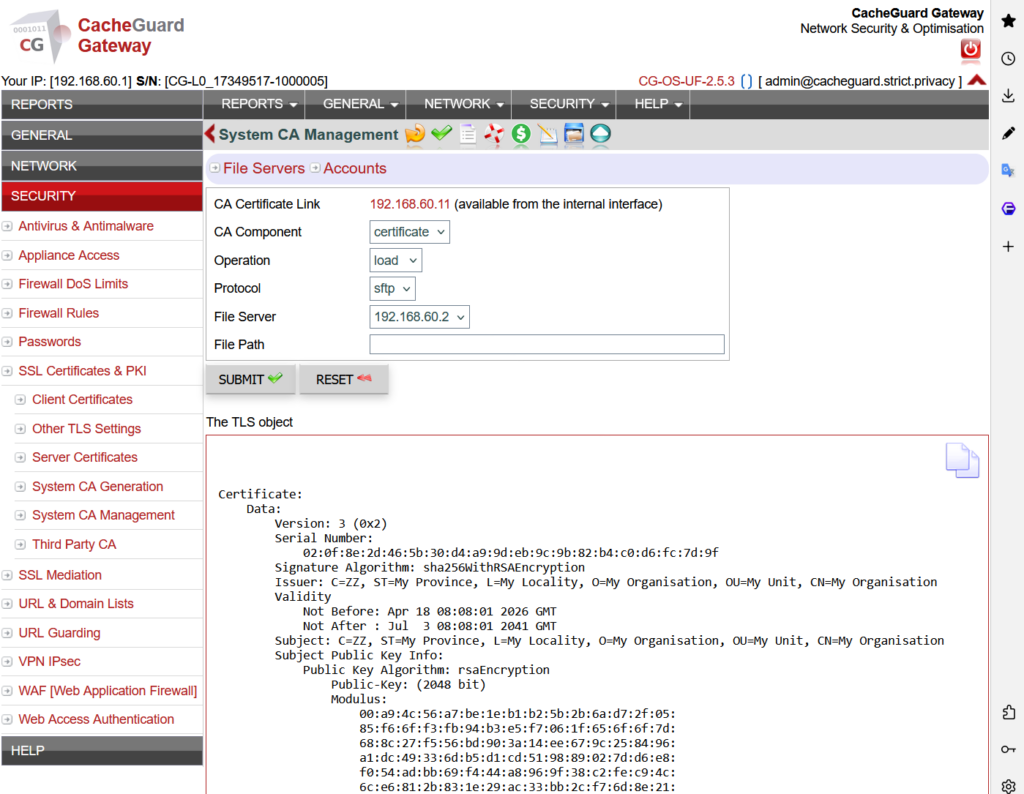
Setting it up involves generating or importing a CA certificate and deploying it to your users’ devices — a process covered step by step in the CacheGuard User’s Guide.
Conclusion
SSL inspection is no longer optional for organizations that want their network security to actually work in a world where most traffic is encrypted. Without it, your antivirus is working blind on the majority of your network traffic — and you are missing the bandwidth savings that HTTPS caching can deliver.
The key is to implement it thoughtfully — with a clear exception management policy for SSL-pinned applications and appropriate exclusions for sensitive sites.
Download CacheGuard for free and have your network fully protected — including encrypted traffic — in under an hour.
Questions about deploying CacheGuard? Visit the community forum at help.cacheguard.net or browse the full documentation at CacheGuard Documentation.